

Updated October 2026 for iPhone 18 Pro and iPhone Duo.
Quick answer: To check Apple Store pickup availability for an iPhone, open the Apple Store app or apple.com, choose your exact model, color, storage and carrier, then tap Check availability under the pickup option and enter your ZIP code. Stores with stock show Available Today or a pickup date. Order, wait for the “ready for pickup” notification, then bring your order number and a government-issued photo ID.
Same-day pickup is often the fastest way to get a new iPhone, especially in the weeks after a launch, when delivery dates slip. Here is how to check stock at your local Apple Store, how to improve your chances of getting one today, and what to bring when you collect it.
How to check pickup availability in the Apple Store app
- Open the Apple Store app and tap the iPhone you want.
- Choose the model, color and storage. Then choose a carrier or Connect to any carrier later (unlocked). Availability is tracked for each exact configuration, so a store can have one color in stock and not another.
- Under the delivery and pickup options, tap Check availability and enter your ZIP code, or let the app use your location.
- Scroll the list of nearby stores. Each one shows Available Today, a later pickup date, or Currently unavailable.
- Pick a store with stock, add the iPhone to your bag and check out with Pickup selected. If the store offers time slots, choose one.
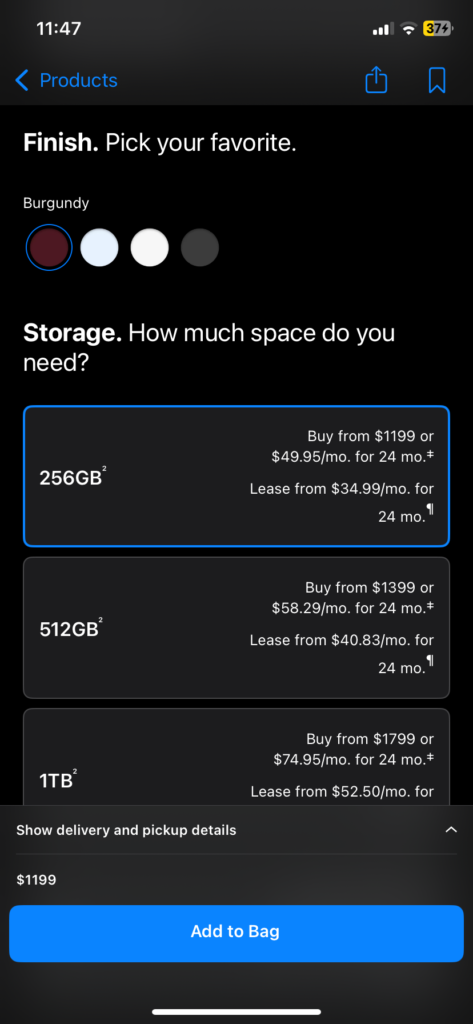
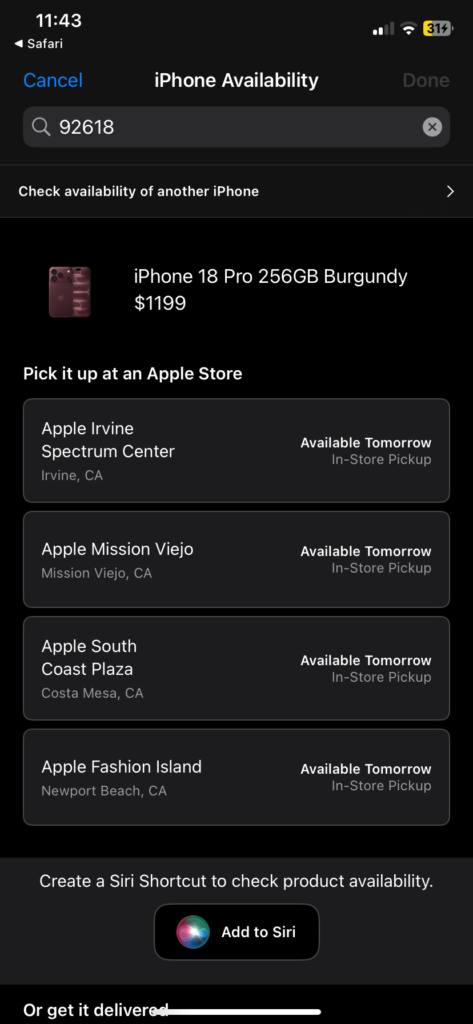
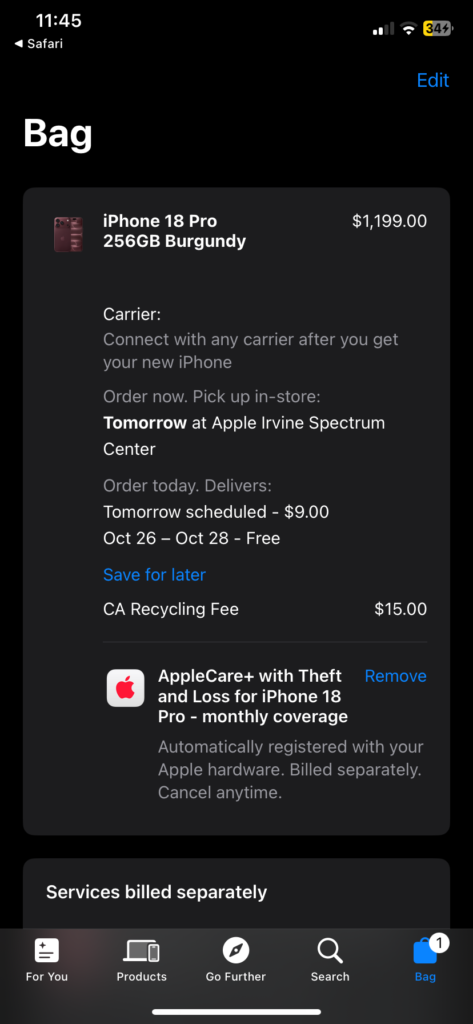
How to check on apple.com
- Go to apple.com, choose iPhone, then Buy on the model you want.
- Select the same options: model, color, storage and carrier.
- In the delivery and pickup section, click Check availability and enter your ZIP code.
- Choose a store showing stock and check out with pickup.
The website and the app use the same inventory, so you won’t find extra stock by switching between them. Use whichever is quicker for you.
Prefer to talk to someone?
You can call Apple at 1-800-MY-APPLE (1-800-692-7753) and ask a specialist to place a pickup order. You can also walk into the store and ask, but on busy launch days walk-in stock can be limited, so checking online first saves a wasted trip.
How to improve your chances of same-day pickup
- Be flexible on color and storage. The most popular combinations sell out first. If you aren’t set on a color, check every option.
- Check several stores. The store list covers every Apple Store near your ZIP code. A store 30 minutes further away may have the model your closest one doesn’t.
- Try unlocked as well as your carrier. The unlocked version is a separate stock item. If you go unlocked, you can activate your carrier during setup.
- Check back later. Availability changes as stores receive new stock and as orders are canceled. A model that shows unavailable in the morning can appear later the same day.
- Consider refurbished. If you don’t need the newest model, Apple’s certified refurbished iPhones ship with a new battery and a full one-year warranty.
Can you pre-order an iPhone for in-store pickup?
Usually, yes. During pre-orders, Apple often offers in-store pickup on launch day, but only at stores with stock set aside for it, and those slots go quickly. If pickup is grayed out when you pre-order, choose delivery or check again later. Pickup availability for launch day can open up as Apple allocates more stock to stores.
If you missed the pre-order window, keep checking on launch day itself, because stores receive their launch stock and availability can change throughout the day.
iPhone 18 Pro and iPhone Duo pickup
The iPhone 18 Pro and iPhone 18 Pro Max went on sale September 18, 2026. With the launch rush over, pickup stock is usually easier to find, but popular colors and higher storage tiers can still show limited availability at some stores.
The foldable iPhone Duo goes on sale October 23, 2026, starting at $1,999. Pre-orders opened September 12, and early supply is reportedly limited. To try for same-day pickup on launch day, check availability in the Apple Store app early that morning and keep checking. Our iPhone Duo pre-order guide has the full timeline.
What to bring when you pick up your iPhone
Don’t head to the store until you get the “ready for pickup” email or notification. Then bring:
- Your order number
- A valid government-issued photo ID
- The QR code or Wallet pass from your pickup notification. Apple says screenshots or photos of the QR code email won’t be accepted, so open the original email or add the pass to Wallet.
For carrier iPhones, the primary account holder or an authorized user must pick up. If the address on your ID doesn’t match the account’s billing address, Apple may ask for a second document showing the correct address, such as a utility bill.
Can someone else pick up my iPhone?
Yes, if you name a designated pickup contact when you place the order. That person needs a government-issued photo ID and the order number. Some products and payment methods aren’t eligible for third-party pickup, and carrier iPhones follow your carrier’s rules on who can collect them.
How long will Apple hold a pickup order?
Apple doesn’t publish a fixed number of days. Your pickup notification includes a deadline, and Apple sends reminders while the order is waiting. If you don’t collect it in time, Apple may cancel the order and refund your payment. Don’t count on a long hold during launch weeks.
Known problems
- “Currently unavailable” at every store: That configuration has no allocated stock nearby. Try another color, storage or the unlocked version, or check again later in the day.
- Pickup option missing at checkout: Some payment methods and some products don’t support pickup. Try another payment method, or choose delivery.
- Turned away with a screenshot: Apple requires the original QR code or the Wallet pass, not a screenshot.
FAQ
How do I check if an Apple Store has an iPhone in stock?
In the Apple Store app or on apple.com, configure the iPhone you want and tap Check availability under pickup. Each nearby store shows Available Today, a later date, or unavailable.
Can I pre-order an iPhone online for in-store pickup?
Often yes, at stores that have launch stock set aside for pickup. If pickup isn’t offered when you pre-order, choose delivery or check again closer to launch day.
How many days does Apple Store pickup take?
If a store shows Available Today, you can usually collect it the same day once you get the ready notification. Otherwise, the store list shows the earliest pickup date.
Is the iPhone Duo available for same-day pickup?
The iPhone Duo goes on sale October 23, 2026. Same-day pickup depends on each store’s stock, and early supply is reportedly limited, so check the Apple Store app early on launch day.
Can someone else pick up my Apple order?
Yes, if you add them as a pickup contact when you order and they bring a photo ID and the order number. Carrier iPhones may require the account holder or an authorized user.
MacReview verdict
Checking pickup availability takes less than a minute, and it is often the difference between having a new iPhone today and waiting days for delivery. Be flexible on color and storage, check a few stores, and don’t give up if everything shows unavailable in the morning. Stock moves throughout the day, especially around launches.
Sources: Apple, Shipping & Pickup help and iPhone purchase help.



















