Updated October 2026 for iOS 27, iPadOS 27 and macOS.
Quick answer: There are 8 FaceTime reactions: Hearts, Thumbs Up, Thumbs Down, Fireworks, Rain, Balloons, Confetti and Lasers. You trigger each one with a hand gesture held up to the camera, like a heart shape with both hands or two thumbs up, or by touching and holding your own video tile and tapping the reaction. If gestures do nothing, Reactions is probably switched off in Control Center.
Been FaceTiming with my younger daughter Jordyn recently and we were messing around with this feature known as “FaceTime Gestures”. We were playing with the few different ones Jordyn knew how to do, so I asked her to ask my older daughter Jaeda if there were any more, aside from the hearts and thumbs up ones. She knew of a few, since she’s a smart teenager, but it got me thinking, there must be more. So here you have it, the complete guide to FaceTime reaction gestures, dedicated to my two beautiful daughters, but to help all of you!
All FaceTime reactions and the gesture for each
| Reaction | Gesture | What you see |
|---|---|---|
| ❤️ Hearts | Make a heart shape with both hands | Hearts float up over your video |
| 👍 Thumbs Up | One thumb up | A thumbs-up bubble |
| 👎 Thumbs Down | One thumb down | A thumbs-down bubble |
| 🎆 Fireworks | Two thumbs up | Fireworks burst behind you |
| 🌧️ Rain | Two thumbs down | A storm cloud and rain |
| 🎈 Balloons | Peace (victory) sign with one hand | Balloons rise across the screen |
| 🎉 Confetti | Peace signs with both hands | Confetti falls over the call |
| 🤘 Lasers | “Rock on” (horns) sign with both hands | Laser beams shoot across the frame |
Hold the gesture for a second or two, away from your face, with your face and hands both in the frame. The effect fills your video for everyone on the call. Apple hasn’t added any new reactions since the feature launched in iOS 17, so this is the complete list on iOS 27 too.
How to use reactions on FaceTime
There are two ways to send a reaction during a FaceTime video call:
- Hand gestures: make one of the gestures above in view of the camera. This is the hands-free way, and it’s what most people mean by “FaceTime gestures.”
- Tap a reaction: touch and hold your own video tile on iPhone or iPad, then tap one of the reaction icons that appear. On a Mac, click the Video menu in the menu bar, then click the arrow next to Reactions and choose one.
Tapping is handy when you’re holding the phone in one hand and can’t make a two-handed gesture like hearts or confetti.
How to turn on FaceTime reactions
New devices may have Reactions switched off. Since iOS 17.4, Apple shows a “Turn On Reactions” prompt instead of having gestures always on, and some people find them off after an update. To turn them on:
iPhone or iPad
- Start or join a FaceTime video call. The control only appears while a call is active.
- Open Control Center: swipe down from the top-right corner (or up from the bottom on an iPhone with a Home button).
- Tap the video controls at the top of Control Center. Depending on your iOS version, this shows a camera icon and is labeled Video Effects or FaceTime Controls.
- Tap Reactions so it’s highlighted.
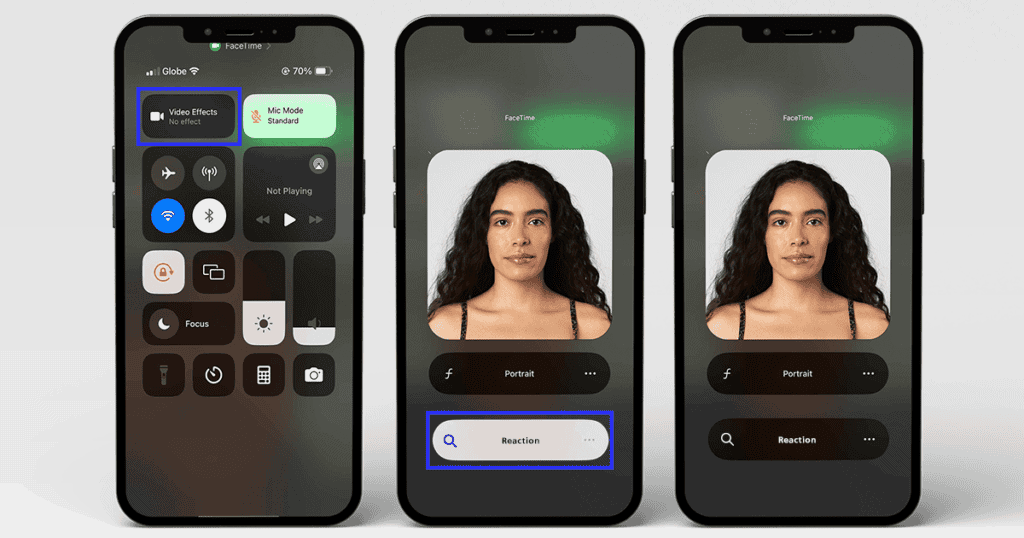
The setting sticks for future calls, so you only need to do this once.
Mac
- Start a FaceTime video call.
- Click the Video icon (a green camera) in the menu bar.
- Click Reactions so it’s highlighted.
How to turn off FaceTime reactions
Reactions are fun with family, but less so when a thumbs-up during a work call or a doctor’s appointment sets off fireworks. Turning them off uses the same switch:
- iPhone or iPad: during a call, open Control Center, tap Video Effects (or FaceTime Controls), then tap Reactions so it’s no longer highlighted.
- Mac: during a call, click the Video icon in the menu bar, then click Reactions so it’s no longer highlighted.
Turning Reactions off stops the gestures from triggering effects. If you also use Zoom or another video app, check the setting once during a call in that app too.
Do FaceTime reactions work in Zoom, Google Meet and other apps?
Yes. Reactions are a system camera feature, so the gestures can work in third-party video apps like Zoom, Google Meet and Webex, not just FaceTime. Since iOS 17.4 and macOS Sonoma 14.4, developers can choose to have reactions off by default in their apps, so whether gestures work out of the box depends on the app. If you get unexpected balloons in a work meeting, turn Reactions off using the steps above while that app’s call is running.
Which devices support FaceTime reactions?
| Device | Requirement |
|---|---|
| iPhone | iPhone 12 or later, iOS 17 or later |
| iPad | iPadOS 17 or later on a model with an A14, M1 or newer chip |
| Mac | macOS Sonoma or later on a Mac with Apple silicon, or any Mac using Continuity Camera with an iPhone 12 or later |
| Apple TV 4K | FaceTime on Apple TV 4K, using your iPhone as the camera |
FaceTime reactions not working? Try this
- Check that Reactions is on. This is the most common cause. Follow the “turn on” steps above during a call.
- Check your device. iPhone 11 and older models don’t support reactions.
- Hold the gesture longer. Keep your hands still for a second or two, away from your face.
- Get your face and hands in frame. Move the phone back a little so the camera can see both.
- Clean the front camera and check that a case or screen protector isn’t covering it.
- Update your software, then restart. If gestures still don’t work, turn FaceTime off in Settings, restart, and turn it back on.
FAQ
What are all the reactions on FaceTime?
There are eight: Hearts, Thumbs Up, Thumbs Down, Fireworks, Rain, Balloons, Confetti and Lasers. Each has its own hand gesture, listed in the table above.
What does the Reactions button do on FaceTime?
The Reactions button in Control Center (or in the Video menu on a Mac) turns gesture reactions on or off. When it’s highlighted, your hand gestures trigger effects during video calls.
How do you do hearts on FaceTime?
Make a heart shape with both hands and hold it up to the camera for a moment. You can also touch and hold your video tile and tap the heart.
How do you do fireworks on FaceTime?
Give two thumbs up at the same time. One thumb up gives a thumbs-up bubble instead.
Can the other person see my FaceTime reactions?
Yes. The effect appears in your video feed, so everyone on the call sees it, even if their device doesn’t support reactions.
Are there new FaceTime reactions in iOS 27?
No. iOS 27 added Dual Capture and better call quality on weak connections, but the eight reactions and their gestures are the same as in iOS 17.
MacReview verdict
FaceTime reactions are one of those features that make video calls with family more fun. Learn the two-handed gestures, use touch and hold when your hands are full, and remember where the Reactions switch is before your next work call.
Video: FaceTime reactions in action
Sources: Apple, Use video effects and mic modes during video calls on Mac; MacRumors; 9to5Mac.