On November 16, Apple pushed out iOS 27.3 developer beta 2, and testers spotted something new in the Apple TV app: a home for video podcasts. Apple’s own page for creators labels the feature “Coming soon,” which means most people who want to watch video podcasts on Apple TV have two routes right now, one that works today and one that arrives with the next update.
The good news is that neither route costs anything extra. Video podcasts in the Apple TV app are not part of the paid Apple TV subscription, so the shows you already follow on your phone should simply turn up on the big screen once the update lands.
What you need to watch video podcasts on Apple TV
The requirements depend on which app you use. The Podcasts app already plays video on current software, while the Apple TV app version is tied to the 27.3 releases that are still in beta.
| Route | Where it works | Status |
|---|---|---|
| Podcasts app | Apple TV 4K on tvOS 27, Mac on macOS 27, iPhone and iPad | Available now |
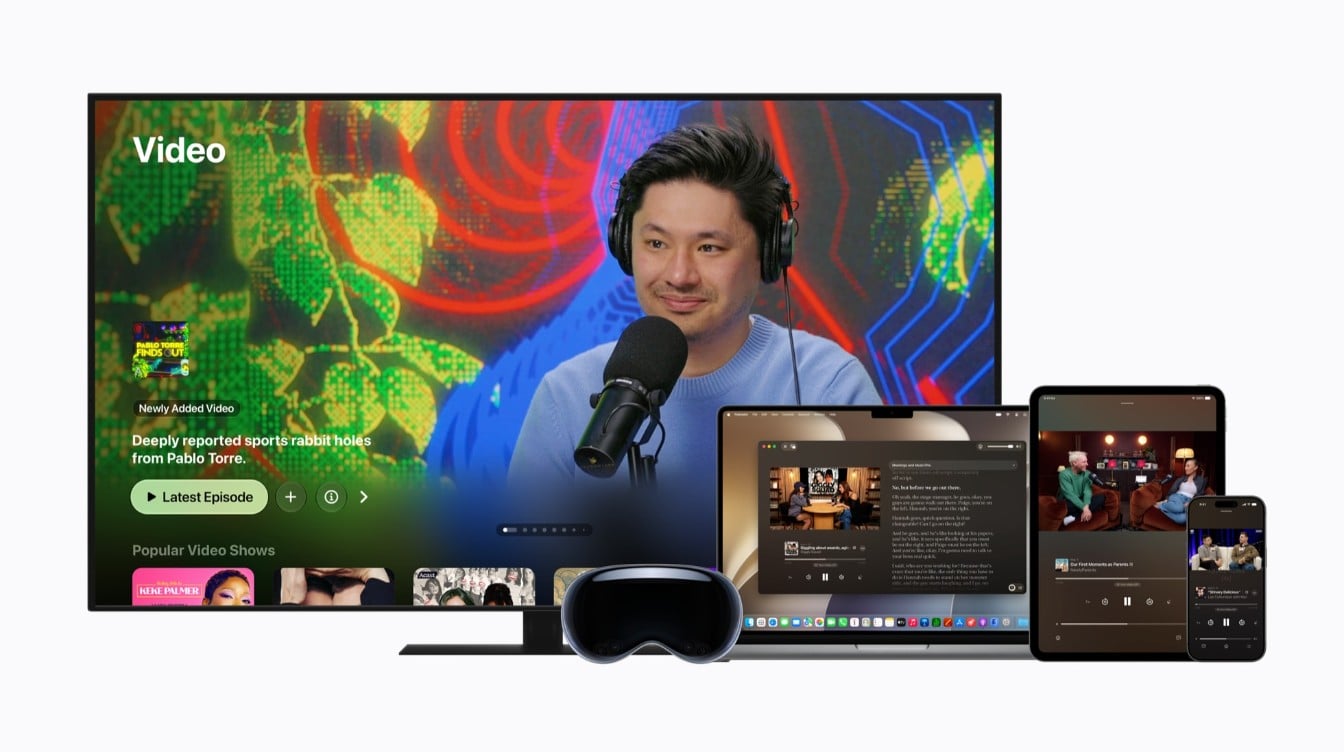
| Apple TV app | Apple TV 4K, iPhone, iPad, Mac, CarPlay cars and some smart TVs | In the 27.3 developer betas, wider release not dated |
Region matters too. Apple says the Apple TV app version is limited to five countries for now: the United States, Canada, Mexico, the United Kingdom and Australia. Everyone else who wants to watch video podcasts on Apple TV can keep using the Podcasts app, which is where video episodes already live.
How to watch video podcasts on Apple TV with the Podcasts app today
Apple rebuilt the Podcasts app for tvOS 27, and the new version handles video episodes and premium subscriptions. If your box is up to date, this is the simplest way to watch video podcasts on Apple TV this week.
- Make sure your Apple TV 4K is running tvOS 27 or later.
- Open the Podcasts app. A sidebar now runs down the side of the screen with Home, New, Library and Search.
- Pick Search and type the name of a show you already follow, such as a daily news show or a long interview series.
- Open the show page and pick an episode. If you started it on another device, the show page lets you resume from where you stopped.
- Use the full-screen Now Playing view to get back to the episode after you browse away.
Following a podcast network. Some networks now have channel pages in the app. From a channel you can browse that network’s shows, and some offer a subscription for ad-free listening and early episodes.
Larger text on the TV. tvOS 27 adds the extended accessibility text sizes, labeled AX1 through AX5, which help if you sit far from the screen.
Watching on a Mac, iPhone or iPad
On macOS 27, episodes that include video get a label in the Podcasts app, and pressing play starts the picture rather than just the audio. You can go full screen or pop the video into Picture in Picture, which shrinks it to a small player while you keep working.
On iPhone, iPad, Mac and Vision Pro, video episodes also come with read-along transcripts, chapters and media links. That makes it easy to jump to the part of a two-hour episode you actually care about.
What changes when video podcasts reach the Apple TV app
The bigger shift is the Apple TV app itself. Once the 27.3 updates ship, you will be able to watch video podcasts on Apple TV next to the shows and films in the same app, and on far more screens than Apple’s own box. Apple’s list covers its own box, iPhone, iPad and Mac, plus cars with CarPlay and smart TVs that support the app.
Podcasters do not have to sign up for anything. According to Apple’s support page on video podcasts in the Apple TV app, every valid, public video show in the Apple Podcasts catalog shows up on its own, with no extra agreement. If a show you like posts video today, it should be there.
Captions supplied by the publisher work through the app’s normal accessibility controls, and Apple is nudging creators toward 1080p or 4K video. Expect ads too: existing video ads will play for TV viewers just as they do elsewhere.
Limits on paid shows and other catches
- Subscriber-only episodes stay in Podcasts. The Apple TV app cannot play shows you pay for through Apple Podcasts subscriptions. Apple says those still play in the Podcasts app on Apple TV and on your other devices.
- Five countries only. Outside the US, Canada, Mexico, the UK and Australia, the Podcasts app remains the place to go.
- No firm date. The feature is only in developer betas. Apple has not said when iOS 27.3 or tvOS 27.3 will reach everyone, so until then the Podcasts app is the only way to watch video podcasts on Apple TV.
- Smart TV details are thin. Apple says supported smart TVs get the feature but has not published a list of which models.
If you want something to tinker with in the meantime, our guide to Apple TV app Multiview on iPhone covers another recent addition, and if your box is getting old, see our Apple TV 4K 2026 vs 2022 comparison before the update arrives.
Frequently asked questions about video podcasts on Apple TV
Does Apple TV have podcasts?
Yes. The Podcasts app on Apple TV 4K was redesigned for tvOS 27 and plays video episodes, and video podcasts are also coming to the Apple TV app with the 27.3 updates.
Do you need an Apple TV subscription to watch video podcasts?
No. You can watch video podcasts on Apple TV without paying for the Apple TV subscription service, which Apple says does not include them.
Which countries get video podcasts in the Apple TV app?
For now, the United States, Canada, Mexico, the United Kingdom and Australia. Viewers in other places can still watch in the Podcasts app.
Should you wait for video podcasts in the Apple TV app?
Not if you have a current Apple TV 4K. The Podcasts app on tvOS 27 already lets you watch video podcasts on Apple TV, so start there tonight. The Apple TV app version matters most for smart TV owners, and anyone who pays for a show through Apple Podcasts should know those episodes stay in the Podcasts app. Either way, the couch just became a decent place to catch up on that interview everyone keeps quoting.
Featured image courtesy of Apple.