The iOS 27 Health App Redesign, Explained: Why It Left the Beta

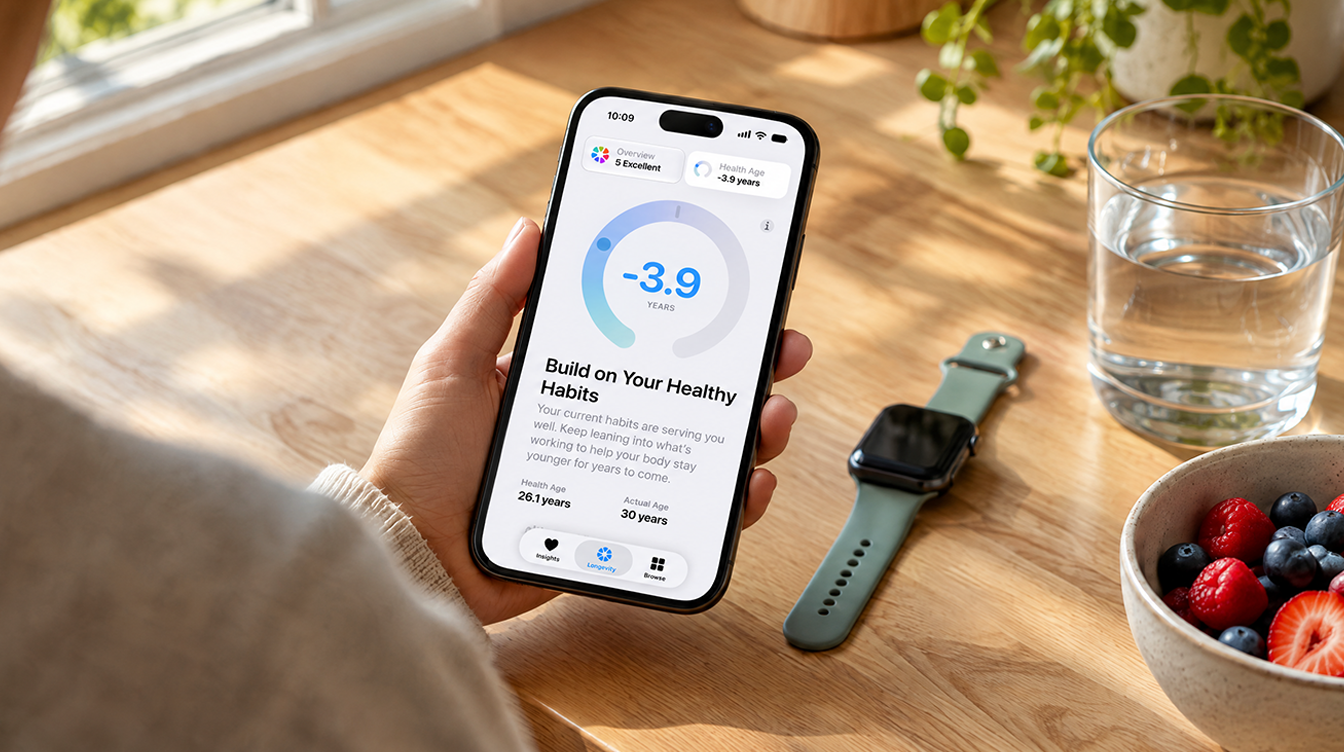
Hand holding a phone over a kitchen counter with a smartwatch nearby, waiting on the iOS 27 health app redesign

Apple has pulled the iOS 27 Health app redesign from its iPhone betas, so if Health on your phone still looks like the version you already know, nothing is broken. The new app is still on Apple’s calendar for late 2026. It just will not be part of iOS 27.2, which many testers had assumed it would be.

The switch happened with iOS 27.2 beta 4 (build 24B5110a), which reached developers on October 13, 2026. As first spotted by MacRumors, opening Health after installing it brings up a notice explaining that the new features will come in a future update, and the older app is back where it was.

What beta 4 rolled back

Developers had been testing the iOS 27 Health app redesign since the very first iOS 27.2 build, and people in Apple’s public beta program got it in their first two releases. Beta 4 undoes all of that. The familiar layout returns, and the Longevity area the rebuild added is replaced by the Sharing section that longtime Health users will know on sight.

The wording Apple shows inside the app says the overhaul is “coming later this year.” That matches the Apple Watch Series 12 product page, where the new Health app still carries a “Coming late 2026” label. So this reads as a delay, not a cancellation.

Why your iOS 27 Health app looks the same

A common snag is seeing Health Age screenshots online, opening your own iPhone and finding nothing new. The explanation depends on what you are running.

  • A regular public iOS 27 release: you never had the new app. It only ever lived in 27.2 test builds, so nothing has been taken from you.
  • iOS 27.2 beta 4 or later: the rebuild was removed on purpose. Restarting, reinstalling Health or resetting settings will not bring it back.
  • An older 27.2 beta: you may still have the new design until you update, though Apple’s own beta 3 notes warned that personalized summaries in the Insights tab might fail to appear.

What the iOS 27 Health app redesign actually adds

Apple is rebuilding Health around Apple Intelligence, with the aim of turning a pile of readings into advice you can use. From Apple’s description, the main pieces look like this:

  • Insights tab. Daily numbers and trends across sleep, heart, vitals, fitness, cycle tracking and readiness, with suggestions such as tweaks to your bedtime routine.
  • Health Age. A single figure that shows which habits are aging you and which are helping, built from VO2 max, heart rate variability and sleep. You can also feed in results from blood work.
  • Longevity tab. Deeper analysis of your Watch and iPhone data, plus physical assessments you can do at home.

Read the small print before you get excited. Apple says the iOS 27 Health app redesign needs an iPhone or iPad that supports Apple Intelligence and runs current software. Health Age only works with an Apple Watch, certain features are limited to adults 18 and up, and some will not launch in every country or language. For the VO2 max test you need an Apple Watch, AirPods Pro 3 or a heart rate sensor from another brand. We went deeper on the scoring in our piece on what Health Age actually measures.

What happens to the data you logged in the beta

It stays put. Apple’s beta 4 notes say anything you recorded while trying the iOS 27 Health app redesign is kept, and you can look at it through the Settings app until the redesign returns.

Booked lab work? Slow down. The rebuilt app let testers schedule blood tests with Quest Diagnostics. Apple’s beta 3 notes advised anyone with an upcoming appointment to hold off on iOS updates until results come back, and to call Quest directly if a booking goes sideways. Results can also be found under Browse > Lab Results.

iOS 27 Health app release date: what is known

Apple has committed to late 2026 and nothing more specific. iOS 27.2 itself should land later this month. HomePod mini 2 reaches stores on October 30 and runs HomePod software 27.2, so the matching iPhone update almost has to be out by then. Going by beta 4, it will arrive without the iOS 27 Health app redesign.

Our read is that the new app comes back in a later beta round before it reaches everyone. Apple has not named the version that will carry it, and with the year already in its final quarter, there is not much room left on that late 2026 promise. If you want the bigger picture on how this cycle has gone, our iOS 27 release date guide covers the timeline so far.

Questions about the delayed Health app

Is the iOS 27 Health app not updating because of a bug?

No. Apple removed the new design on purpose in iOS 27.2 beta 4, and the app now shows a notice that the new features will arrive in a future update.

Will I lose Health data I added during the iOS 27.2 beta?

No. Apple says data recorded while testing the redesign is kept, and you can view it in the Settings app for now.

Does the new Health app need an Apple Watch?

Partly. Health Age requires an Apple Watch, while the rest of the redesign needs an iPhone or iPad that supports Apple Intelligence.

Is the iOS 27 Health app redesign worth staying on the beta for?

Not anymore. Beta testers gain nothing Health-related by sticking with 27.2 builds, and anyone waiting on Quest results should pause updates until they arrive. Everyone else can install iOS 27.2 when it ships and keep using the current app until the iOS 27 Health app redesign is ready. Your Health Age can wait a little longer.


This is a recurring post, regularly updated with new information and offers.

The MacReview YouTube Channel

The MacReview YouTube Channel

Visit Our
Youtube Channel

Watch Anywhere, Anytime!

Three iPhones on a dark background with pink lighting showing the ChatGPT and Apple Music connection flow, including an "Apple Music" app page with a Connect button, a "Connect Apple Music" permissions dialog, and a ChatGPT chat generating a holiday song playlist.
Apple Music now works as a ChatGPT extension, so you can search tracks and build playlists using plain language. Here is how to set it up and use it.
Reward your inbox with the TPG Daily newsletter img

Subscribe to Our Newsletter

REWARD YOUR INBOX WITH THE MACREVIEW NEWSLETTER

Microsoft 365 wordmark surrounded by glossy app icons for Word, Excel, PowerPoint, Outlook, OneNote, Exchange, and Microsoft 365 on a soft light background.

Microsoft 365 experienced a significant service disruption affecting business and enterprise customers across North America. The outage impacted core productivity services including Outlook email, Microsoft Defender, and administrative portals, leaving users unable to access critical business tools for several hours. […]

Wireless printer with WiFi signal icon representing Apple AirPrint enterprise printing

When Apple introduced AirPrint in 2010, enterprise IT administrators largely dismissed it as a consumer-focused feature. More than a decade later, AirPrint has fundamentally transformed how organizations handle printing infrastructure, forcing the entire industry to abandon complex driver management in […]

Password Utility Solves the FileVault Reboot Problem for Remote Mac Management

Managing remote Macs presents unique challenges, particularly when FileVault encryption creates accessibility issues during restarts. A new utility from Twocanoes Software addresses this long-standing problem for IT administrators who need reliable access to devices deployed across distributed locations. The FileVault […]

iPhone and AirPods on a black and white background

Introduction A recent rumor from China suggests that Apple is set to continue with the color-infused back glass technology in the upcoming iPhone 16, mirroring the aesthetic introduced in the standard iPhone 15 models. This development indicates a consolidation of […]

Man working on a laptop in a modern office at night with “Creator Studio” text and Apple logo above, plus floating creative app icons in the foreground.

Apple is reportedly planning to expand its subscription bundle offerings and introduce more paid features across its software ecosystem, following the launch of Apple Creator Studio last month. The company appears to be evaluating opportunities to monetize additional areas of […]

Three iPhones on a dark background with pink lighting showing the ChatGPT and Apple Music connection flow, including an "Apple Music" app page with a Connect button, a "Connect Apple Music" permissions dialog, and a ChatGPT chat generating a holiday song playlist.
Apple Music now works as a ChatGPT extension, so you can search tracks and build playlists using plain language. Here is how to set it up and use it.
Hands hold a glowing smartphone at a sunlit kitchen table beside a laptop, a fix for Siri AI not working
Siri AI is a beta you have to request, so a missing assistant is usually a setup issue rather than a bug. Here are seven things to check, easiest first, and when to simply wait.
Apple Arcade games available across Apple devices

In 2025, you’ll notice significant changes in Apple Arcade’s fan favorites, as exclusive updates aim to refine and enhance your gaming experience. Titles like WHAT THE CAR? and Hello Kitty Island Adventure are set to receive major gameplay improvements, alongside […]

Resident Evil 2 on iPhone, iPad and Mac

With the anticipated release of Resident Evil 2 on iOS and macOS, set for December 10, 2024, fans of the franchise are on the edge of their seats. This iconic survival horror game promises a refreshed experience tailored for mobile […]

Phone playing an audiobook beside earbuds and a paperback on a park bench, tracking Spotify audiobooks listening hours
Spotify is bringing audiobooks to more than 180 markets, with 12 hours a month included in eligible Premium plans. Here is how that time is counted, how to check what is left and how to buy more.
Microsoft 365 wordmark surrounded by glossy app icons for Word, Excel, PowerPoint, Outlook, OneNote, Exchange, and Microsoft 365 on a soft light background.

Microsoft 365 experienced a significant service disruption affecting business and enterprise customers across North America. The outage impacted core productivity services including Outlook email, Microsoft Defender, and administrative portals, leaving users unable to access critical business tools for several hours. […]

Sign Up For Newsletter mobile

Catch The Latest

Sign Up For Newsletter

Updated October 2026 for iOS 27, iPadOS 27 and macOS. Quick answer: There are 8

Apple Music now works as a ChatGPT extension, so you can search tracks and build
A new Health Sensing System, heart rate every five seconds, a 0-to-10 readiness score, and
Six laser-cut blades, four aperture stops, and a 2nm chip. Here is every confirmed iPhone
Scroll to Top