

This post contains affiliate links. If you buy through them, we may earn a commission at no extra cost to you. Read our disclosure.
Disclosure: This article contains affiliate links. If you sign up through one of them MacReview may earn a commission at no extra cost to you. We only recommend tools we’d use ourselves.
Apple’s Digital Legacy feature does one thing extremely well and one thing not at all.
Before it existed, families faced twenty years of photos sealed inside an Apple Account and a support process that often ended in a court order or nothing at all. There were news stories about widows hiring lawyers to reach their husbands’ photo libraries. Apple built Digital Legacy to fix that, and it works.
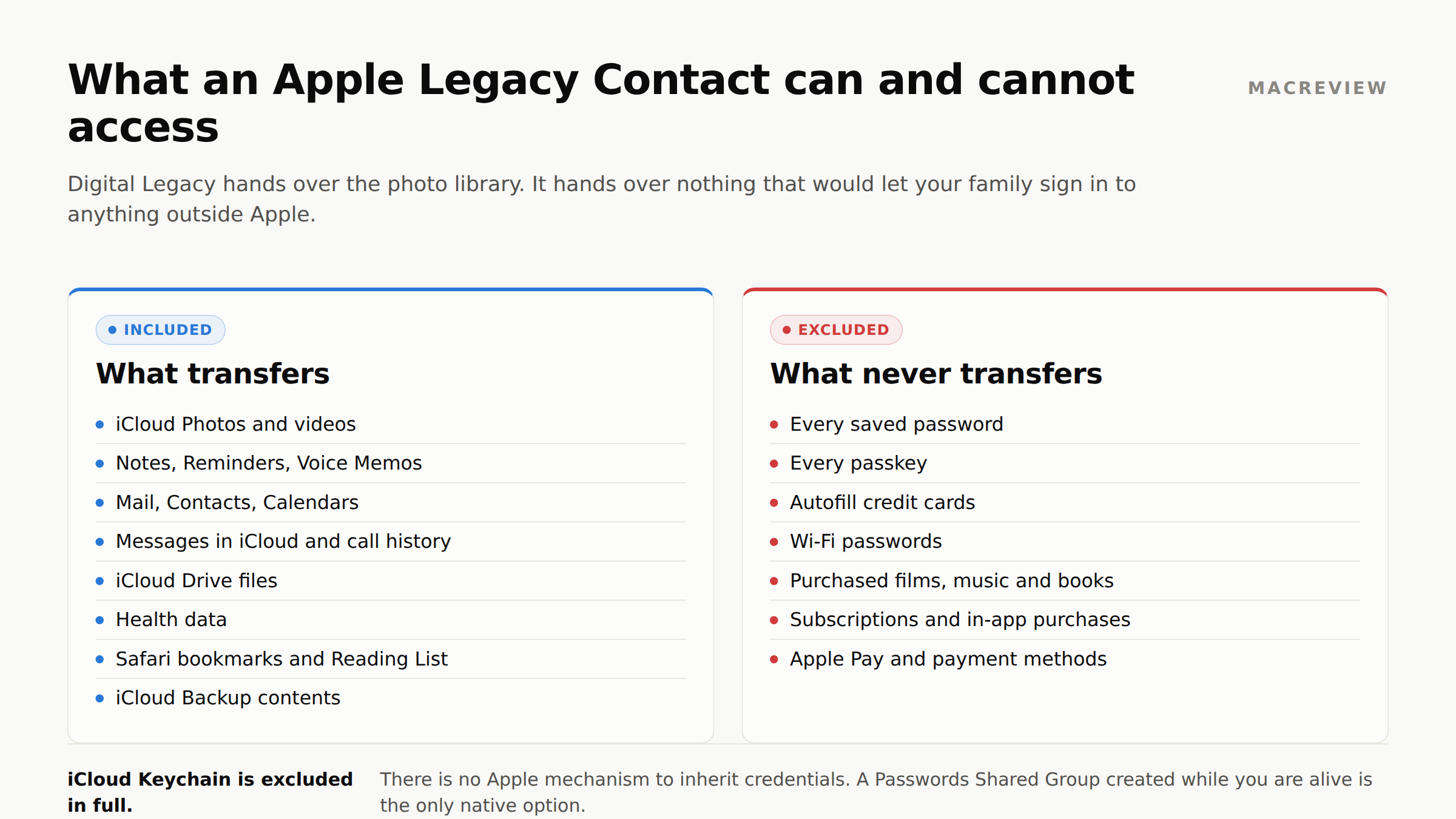
What it does not do, and what Apple’s documentation never puts in a headline: a Legacy Contact receives none of your passwords. iCloud Keychain is excluded in full. No saved logins, no passkeys, no stored cards, no Wi-Fi passwords. The person you name can read every email in your inbox and still cannot sign into your bank.
That gap, plus two smaller ones, is what this page is about: what transfers, what does not, and what to do about the difference.
What a Legacy Contact does get
After you die, your Legacy Contact submits the access key you gave them plus a death certificate (Japan accepts a family certificate; requirements vary by region). Uploads must be PDF, PNG, TIF, JPEG, or GIF at 300 dpi or better, filed from Settings on their own device or at digital-legacy.apple.com.
Once Apple approves the request, they can access:
- iCloud Photos and videos
- Notes, Reminders, Voice Memos
- Mail, Contacts, Calendars
- Messages in iCloud and call history
- iCloud Drive files
- Health data
- Safari bookmarks and Reading List
- iCloud Backup contents, including device photos and app download history
For most families the photos alone are the reason the feature exists.
What a Legacy Contact never gets
1. Every password, passkey, and saved card
iCloud Keychain is entirely excluded. Your Legacy Contact gets none of it: no Safari usernames and passwords, no internet account credentials, no autofill credit cards, no Wi-Fi passwords, no passkeys.
They can see your Notes but cannot reach the brokerage account, the domain registrar, the business email, or the crypto exchange. Everything outside Apple’s walls stays locked, and there is no Apple mechanism to inherit credentials at all.
The only workaround on Apple’s own stack is a Passwords Shared Group created while you are alive: Passwords app → create a group → add people (they must be in your Contacts). Everyone in the group can see and edit those credentials immediately. That is a real trade-off, because it is not “after I die” access, it is “right now” access, and it is the only native option that exists.
| What you need | Apple gives you | What it does not cover |
|---|---|---|
| Photos, files, messages | Legacy Contact hands these over after a death certificate is approved | Nothing. This part works well. |
| Passwords and passkeys | Nothing. iCloud Keychain is excluded in full | Every account outside Apple: bank, brokerage, registrar, business email |
| A list of what exists | Nothing. Apple stores no inventory of your accounts or policies | Which banks, which insurers, which advisors |
| Access for a specific person | All-or-nothing. One contact gets everything, or nobody does | Giving your executor the will and nothing else |
2. Purchased content
Movies, music, books, subscriptions, and in-app purchases do not transfer. Your Legacy Contact can reach the photos you took but not the film library you bought. Apple’s licensing terms have always worked this way; Digital Legacy did not change them.
3. Payment information
Apple Account payment methods and Apple Pay details are excluded.
How to set up a Legacy Contact
iPhone or iPad: Settings → [your name] → Sign-In & Security → Legacy Contact → Add Legacy Contact
Mac: System Settings → [your name] → Sign-In & Security → Legacy Contact → Add Legacy Contact
You pick someone from your contacts, and Apple generates an access key for them. Send it via iMessage, which stores a copy on their device automatically and is the least losable option, or print it. A Legacy Contact must be over 13 to request access.
You can name more than one. Apple does not publish a maximum. (You will see “five” repeated on a lot of sites; it is not in Apple’s documentation, so we will not state it as fact.) Any single contact can act alone, including permanently deleting the account, so choose people you would trust with that individually, not as a committee.
The access key is the whole thing. Without it, the request is much harder and may require a court order. With it, the process is straightforward. Print it and store it with your will or wherever your executor will look. Do not store it only in the iCloud account it unlocks. That is a locked key inside a locked box.
Legacy Contact vs Recovery Contact vs Recovery Key
Three similarly named Apple features solve three unrelated problems, and people mix them up constantly.
Legacy Contact is posthumous. It grants someone access to your account data after you die, and only after Apple approves a request backed by an access key and a death certificate. It does nothing while you are alive.
Account Recovery Contact is the opposite: it helps you get back into your own account while you are alive, if you forget your password or get locked out. Your recovery contact supplies a code that lets you reset access. They never see your data, and naming one has no effect after your death.
Recovery Key is not a person. It is a 28-character code you generate and store yourself, and turning it on replaces Apple’s standard account recovery process. It is powerful and unforgiving: lose the key and lose your trusted devices, and you can be locked out permanently with no support path back in. If you enable it, the printed copy belongs wherever your other critical documents live.
The short version: Recovery Contact and Recovery Key are for you, now. Legacy Contact is for your family, later. One does not set up the others.
The three-year clock: read this carefully
A widely repeated claim says a Legacy Contact has three years from your death to request access. That is wrong, and the actual rule is more consequential.
Apple’s three-year window starts when Apple approves the first Legacy Contact request. From that approval, access lasts three years, and then the account is permanently deleted.
So the clock is not a deadline to apply. It is a countdown to erasure that starts the moment your family gets in. Treat it as a three-year window to download everything worth keeping, not as permanent storage. Apple does not document a deadline for filing the initial request.
The bonus nobody mentions: Activation Lock
When a Legacy Contact request is approved, Activation Lock is removed from devices using the original Apple Account. Without that, a deceased person’s iPhone, iPad, and Mac are bricks: bound to an account nobody can sign into, unusable and unsellable.
Families who skip Digital Legacy and hit this wall face Apple’s general deceased-account process instead, which often ends in a court order. That is lawyer money and months of time, to unlock a device.
One firm caveat: Activation Lock removal does not defeat the device passcode. Apple states plainly that it cannot remove a passcode lock without erasing the device. So an iPhone whose passcode nobody knows must be wiped before reuse, and anything stored only on that device is gone. What survives is what is in iCloud. The full recovery path is in our guide to Activation Lock and a deceased owner’s iPhone, Mac, and iCloud.
What to do about the gaps
Digital Legacy covers Apple’s own data well. Everything else is where settling an estate actually happens: the bank, the insurer, the mortgage servicer, the utilities, the business, the will itself. That leaves two jobs Apple does not do:
A written record of what exists. Which banks, which insurers, which policies, which advisors. Not passwords, just the map. An executor with a list of institutions can work; one with a locked phone and no list starts from nothing.
Access granted in advance, scoped to the right person. The sibling handling the estate needs the will and the account list; your spouse needs everything; your adult child may need only the health directive. Apple has no answer for either job: iCloud Drive sharing is per-folder and all-or-nothing, and the Passwords app shares with a group rather than assigning different things to different people.
This is the specific gap Trustworthy fills for Apple households: an encrypted vault with per-item permissions, so each person is granted exactly what they will need and nothing more, in advance rather than during the worst week of someone’s life. It is SOC 2 Type 2 certified, HIPAA compliant, AES-256 encrypted with multi-factor authentication on by default, and does not train AI models on customer data. It also stores your Legacy Contact access key, which needs to survive independently of the account it opens.
Worth knowing first: the free tier is single-user with 2 GB, so the permissioned sharing above is a paid feature at $10/month billed annually for five family members. If you only need a private archive, the free tier does that, and Apple’s own tools may be enough.
Do this tonight
- Set your Legacy Contact. Two minutes. Settings → your name → Sign-In & Security → Legacy Contact.
- Print the access key and put it with your will, not in iCloud.
- Tell the person. A Legacy Contact who does not know they are one is a plan that depends on luck.
- Set up a Passwords Shared Group with whoever would need to act for you, since credentials do not inherit.
- Write the list of institutions, policies, and advisors, and put it somewhere your executor can actually reach.
Steps 1 through 3 take five minutes and cover the failure mode behind all those news stories.
Frequently asked questions
Does a Legacy Contact get my passwords? No. iCloud Keychain is excluded in full: saved logins, passkeys, autofill cards, and Wi-Fi passwords all stay locked. No Apple feature passes credentials on after death. A Passwords Shared Group is the only native alternative, and it shares access immediately rather than posthumously.
How long does a Legacy Contact request take? Apple does not publish a review timeline, and anyone quoting a specific number is guessing. What determines it: whether the requestor has a valid access key (without one, the request falls back to Apple’s much slower deceased-account process, which can require a court order), whether the death certificate is legible and meets Apple’s format rules, whether regional requirements add steps, and whether the certificate details match the account. A clean submission with the access key is the fast path; everything else is measured in weeks and months. Status shows in Settings on the requestor’s device or at digital-legacy.apple.com.
Someone named me as their Legacy Contact. What do I do now? While they are alive you have zero access, and nothing to do except protect the access key. If it arrived by iMessage, your device stored a copy and it appears in your own Sign-In & Security settings; if it arrived on paper, keep it with your important documents. After they die, you will need certified copies of the death certificate, then file from Settings or at digital-legacy.apple.com. Once approved, download everything you want to keep straight away: the three-year clock starts at approval and ends in permanent deletion. Expect Activation Lock to be cleared, and expect not to get their passwords.
Does a Legacy Contact get access while I’m alive? No. The access key does nothing until a request is submitted with a death certificate and approved by Apple. Naming someone gives them zero access today.
Can I be someone’s Legacy Contact without them being mine? Yes. It is one-directional: you hold their access key, and they need yours separately for it to work both ways.
What if I never set a Legacy Contact? Your family can still request access through Apple’s process for a deceased family member’s account, but it is substantially harder: a death certificate at minimum, and often a court order naming the deceased and their Apple Account, establishing the requestor as heir or legal representative, and directing Apple to assist. Expect months and legal fees rather than a form.
Does this cover my Apple Card or Apple Cash? No. Payment information is excluded, and Apple Card and Apple Cash are handled through Goldman Sachs and Green Dot’s own estate processes rather than through Digital Legacy.
Should I just give my spouse my Apple Account password instead? Many couples do, but it is fragile: two-factor authentication can lock them out at the wrong moment, a password change breaks it silently, and it does not clear Activation Lock on its own. Digital Legacy is the supported path.
Can I change or remove a Legacy Contact later? Yes, at any time, in the same Sign-In & Security menu. Removing someone invalidates their access key, so destroy any printed copy of the old key or it will confuse your executor later.
Apple covers the photos. The passwords, the account list, and per-person access have to come from somewhere else. That gap is what a document vault exists to fill.
Affiliate link. MacReview may earn a commission at no extra cost to you.
How do I find out whether I have a Legacy Contact set up on my own account? Look in Settings → [your name] → Sign-In & Security → Legacy Contact on iPhone or iPad, or the same path under System Settings on a Mac. Any name listed there is active; an empty screen means nobody is named. That screen is also where you view, resend, or print an existing access key, so it is worth checking once a year rather than assuming a setup from several years ago survived every device migration since.
Can a Legacy Contact delete my account? Yes. Once Apple approves the request, a Legacy Contact can permanently delete the Apple Account and everything in it. Any single contact you name can do this alone, without the agreement or the knowledge of anyone else you named. That is the strongest argument for choosing people you would trust individually rather than as a group.
Why won’t my access key save? Apple publishes no fix for this, and it recurs on the Apple Community with no authoritative answer anywhere, so treat what follows as the things worth ruling out rather than a solution. Check that you are running iOS 15.2, iPadOS 15.2, or macOS Monterey 12.1 or later, which is Apple’s stated requirement for the account holder, and that iMessage is delivering normally to the address you entered. One thing you can rule out entirely: your Legacy Contact does not need an Apple Account or an Apple device at all. Whether they own a recent Apple device only decides whether the access key lands in their settings automatically or has to be printed and handed over. Print a copy either way, because Apple cannot access or replace an access key that has been lost.
More in this series: what Apple’s iCloud encryption actually covers · iPhone document scanning, and where scans actually save · how to set up Medical ID and Emergency SOS · Activation Lock and a deceased owner’s Apple Account
Sources: Apple: Add a Legacy Contact · Apple: Request access as a Legacy Contact · Apple: Data a Legacy Contact can access · Apple: Request access to a deceased family member’s account



















