

This post contains affiliate links. If you buy through them, we may earn a commission at no extra cost to you. Read our disclosure.
Disclosure: This article contains affiliate links. If you sign up through one of them MacReview may earn a commission at no extra cost to you. We only recommend tools we’d use ourselves.
If you’re reading this because it just happened, here’s the one thing to do before anything else: don’t erase the device, and don’t let a carrier store or a repair shop erase it either. Leave it exactly as it is, and keep it charged. Almost every recovery path gets harder after a wipe, and several become impossible.
The rest can wait a week. Very little of it is urgent, and none of it is as time-sensitive as it feels right now.
Which lock are you actually facing?
The phone won’t open, but there are three different locks behind that, and Apple can help with only some of them. Find yours first.
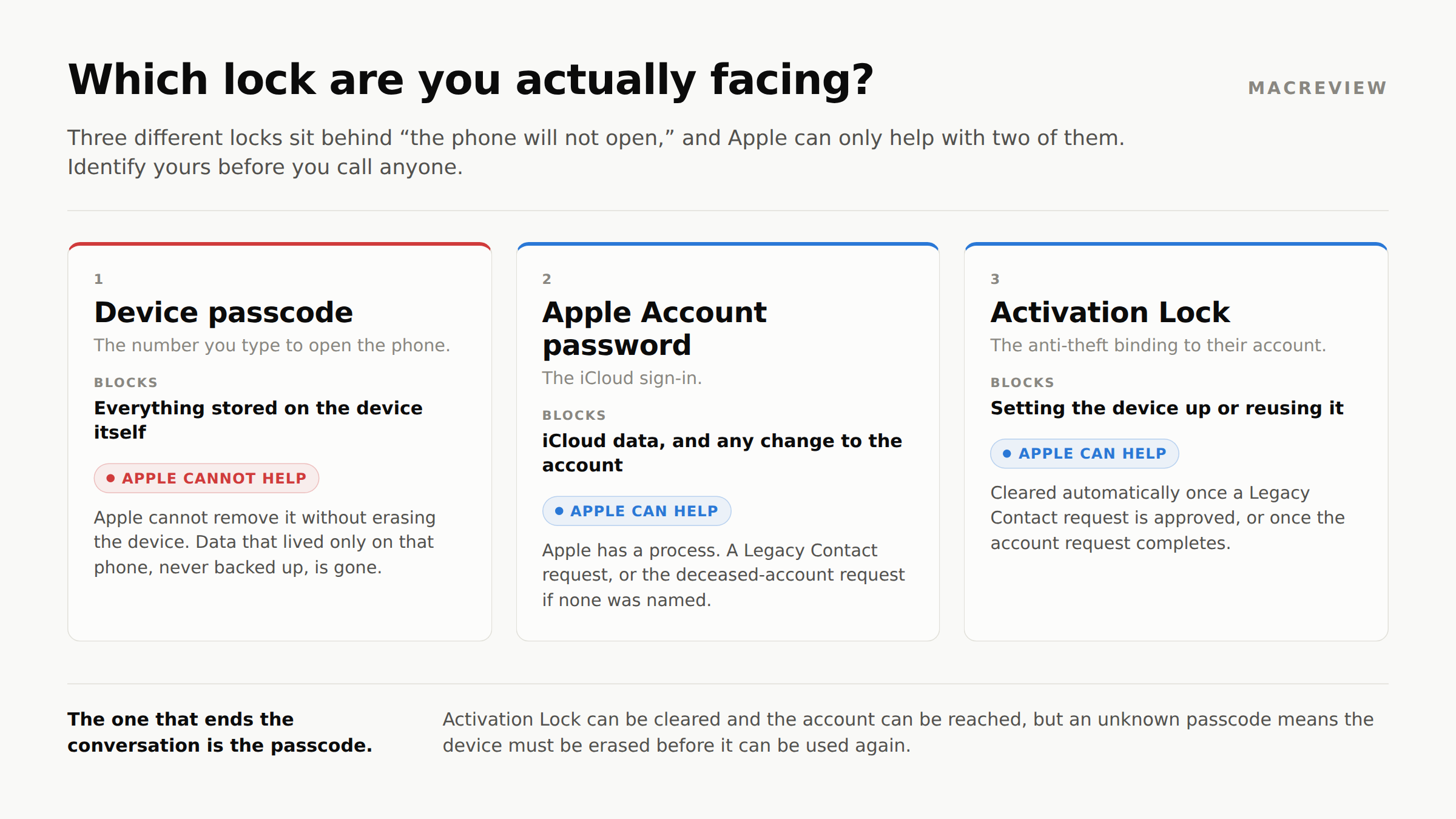
1. The device passcode. The screen says “Enter Passcode” with a number pad. This encrypts what is stored on the device itself. Apple cannot remove it. There is no back door, no escalation, and no court order that produces one. The only way past it is erasing the device, which destroys anything that lived only there.
2. The Apple Account password. You reach the Home Screen or a Mac desktop fine, but something asks you to sign in to iCloud, the App Store, or Messages. This is an account credential, not a device lock. Apple has a process here: Legacy Contact or a deceased-account request.
3. Activation Lock. During setup the device says the iPhone is “Linked to an Apple Account” and demands the original owner’s email and password. This is the anti-theft system, and it survives a full erase. Apple has a process here too, though it is slower and the proof standards are higher.
Hitting two at once is common: a passcode nobody knows on a device that will also demand Activation Lock once erased. Read the trade-off section below first.
“The previous owner has passed away”
If you inherited or bought a device and hit Activation Lock, your position depends on which you are. Family and executors go through Apple’s deceased-account process below. A buyer with no family connection has one route: the estate signing in and removing the device, or an Activation Lock support request backed by an original proof of purchase. Bypass tools sold for this are, at best, a temporary trick on an old iOS version.
Path 1: Your parent named a Legacy Contact
This is the good outcome, and worth checking for first. If your parent set one up, whoever they named received an access key, sent by iMessage or printed and stored with their estate papers. Look in the will folder, the safe, or their Messages thread.
With that key plus a death certificate, the process is straightforward:
- The Legacy Contact submits a request from Settings on their own device, or at
digital-legacy.apple.com. - Upload the death certificate: PDF, PNG, TIF, JPEG, or GIF at 300 dpi or better.
- Apple reviews and approves.
After approval, they get access to photos, videos, Notes, Reminders, Voice Memos, Mail, Contacts, Calendars, Messages in iCloud, call history, iCloud Drive files, Health data, Safari bookmarks, and iCloud Backup contents.
And Activation Lock is removed from devices using the original account, which solves the brick problem in one step without deleting anything.
Two things they don’t get. Passwords and passkeys are entirely excluded: iCloud Keychain does not transfer at all. Purchased movies, music, and books don’t transfer either.
One clock to watch. Access lasts three years from Apple’s approval, after which the account is permanently deleted. This is often misreported as a deadline to apply; it isn’t. It’s a countdown to erasure that starts when you get in, not permanent storage. Download everything you want to keep well before then.
Path 2: No Legacy Contact
This is where it gets harder, and where the “just call Apple” advice falls apart.
Apple has a documented process for requesting access to a deceased family member’s Apple Account. You’ll need, at minimum, a death certificate.
What type of court order is needed
Depending on the circumstances Apple may also require a court order, and Apple is specific about what it must contain:
- The deceased’s name and Apple Account
- The name of the requesting next of kin
- A statement that the deceased was the user of all accounts associated with that Apple Account
- A statement that the requestor is the legal personal representative, agent, or heir of the estate
- An express direction that Apple is ordered by the court to assist in providing access
That last line is what trips people up. A letter of administration naming you executor often isn’t enough on its own; the order frequently has to name Apple and direct its cooperation.
Probate rules and the language courts will sign vary by state and country, and this article is general information rather than legal advice: ask an estate attorney licensed where the estate is being administered.
How long does the request take?
With an access key and a death certificate, Legacy Contact approvals are typically fast, often days rather than months. Without one, expect months: the timeline is driven by obtaining a court order with the required language. That is a legal process, not an Apple one, and Apple’s queue only starts after it.
Activation Lock isn’t a separate favor: it clears automatically once the account access or deletion request completes.
Proof of purchase gets you the device, not the data. With the original receipt you can file an Activation Lock support request with Apple to get the device usable again. That path works, but it gives you no access to the Apple Account or its iCloud contents. Two separate requests, two standards of proof, and conflating them is where most people’s expectations break.
The trade-off almost nobody tells you about
Read this before you file anything. It is the most consequential decision in the process, and easy to make by accident.
Depending on what you request and what documentation you can produce, the route Apple offers may be deletion of the Apple Account rather than access to it. Deletion does clear Activation Lock, so the hardware becomes usable again. It also permanently removes what was in the account: the photo library, iCloud Drive files, Notes, and backups.
Put plainly, a family can end up choosing between the phone and the photos.
Two things follow. If there is any chance you want the iCloud contents, pursue access first and treat deletion as the fallback. And if you get access, export everything before anyone erases a device. The order of operations is the whole game.
Apple assesses these requests individually, so confirm in writing with Apple support what your request will and won’t destroy before consenting to anything irreversible.
How do I access my late husband’s iCloud photos?
Photos are what families ask about most, and usually the most recoverable, because they live in iCloud rather than on the phone.
If any device is still signed in, start there. An iPad or Mac already signed in can often reach the full library with no new credentials at all.
Once you have account access, get the photos out rather than leaving them where they are:
- Sign in at
privacy.apple.comand request a copy of the data. Apple assembles a downloadable archive, the cleanest route for a whole library. - Or open
iCloud.com/photos, select albums, and download. Slower, but immediate. - On a Mac already signed in, open Photos, then File → Export → Export Unmodified Original, preserving dates and metadata.
Do this early. A Legacy Contact’s three-year window ends in permanent deletion.
What to do, in order
Before anything else
- Don’t erase or reset any device
- Keep everything charged
- Keep their phone number active. That number receives the two-factor codes needed to close bank, brokerage, and utility accounts, often for weeks
- Don’t cancel their email account for the same reason: statements and renewal notices arrive there
First week
- Order 10 to 15 certified death certificates. Nearly every institution requires its own certified copy and will not return it, and ordering more later means new fees and another wait
- Look for the Legacy Contact access key
- Look for the will and any trust documents
- Secure the house and forward the mail; mail is how you’ll find accounts nobody knew existed
Weeks two through four
- Submit the Legacy Contact request if you have the key
- Notify Social Security, life insurers, banks, retirement plan administrators, and their employer
- Place a deceased notice with Equifax, Experian, and TransUnion
- Contact Apple, Google, and Meta separately: each has its own process
Notable: Apple Card and Apple Cash aren’t handled through Digital Legacy. They run through Goldman Sachs and Green Dot, each with its own estate procedure.
The conversation to have before any of this
If your parents are alive and you’re reading this as a what-if, there’s a version of this that takes fifteen minutes instead of eight months.
Naming a Legacy Contact takes two minutes and solves the iCloud half. The other half, the account list and the paperwork, needs somewhere a family member can actually reach it.
Affiliate link. MacReview may earn a commission at no extra cost to you.
| What you need | Apple gives you | What it does not cover |
|---|---|---|
| Getting into iCloud | Legacy Contact, if one was named before the death | Nothing was named? A court order, months, and legal fees |
| Unlocking the device | Activation Lock clears once the request is approved | The device passcode. Apple cannot remove it without erasing |
| Passwords and accounts | Nothing. iCloud Keychain never transfers | Every login outside Apple |
| Knowing what exists | Nothing. There is no list to inherit | Which banks, insurers, policies and advisors |
Ask them to set a Legacy Contact. It’s the single highest-value thing they can do, it costs nothing, and it requires no lawyer:
Settings → [their name] → Sign-In & Security → Legacy Contact
Then ask for the access key and put it somewhere that isn’t their iCloud account. Our guide to setting up an Apple Legacy Contact walks through the setup and its limits.
The harder ask, and the more valuable one, is the part Apple can’t help with. Passwords don’t inherit. Insurance policies aren’t in iCloud. The will isn’t in Photos. What an executor needs is a map: which banks, which insurers, which advisors, and where the paperwork lives.
The framing that works is small and specific, not “let’s discuss your estate planning”:
“If something happened tomorrow, would I know where to find your will, your insurance policies, and your accounts? Can we put a list somewhere I can reach?”
That’s answerable in an afternoon, and it removes most of the pain from everything above.
The practical mechanism is a shared vault with permissions granted in advance, so the information reaches you without your parents handing over blanket access to accounts they manage perfectly well themselves. Trustworthy is built for this: per-item permissions let a parent share their will, insurance declarations, and account list with one adult child while keeping everything else private. It’s SOC 2 Type 2 certified with AES-256 encryption and multi-factor authentication required by default, and it’s a sensible place for the Apple access key itself, which needs to survive independently of the account it unlocks. The free tier is single-user with 2 GB, so shared access is a paid feature: currently $10/month billed annually for five family members.
If you’d rather build the list first, our checklist for scanning documents with an iPhone has the paperwork inventory.
Frequently asked questions
Can Apple unlock my deceased parent’s iPhone? Apple can remove Activation Lock through Legacy Contact or its deceased-account request process. It cannot bypass the device passcode: that requires erasing the device. The phone can be made usable again, but data stored only on it and never backed up is unrecoverable.
How long does the Apple process take without a Legacy Contact? Expect months, driven mostly by obtaining a court order with the required language, which is a legal process rather than an Apple one. With an access key, approval is typically far faster.
Do I need a lawyer? With a Legacy Contact access key, no. Without one, almost certainly yes: the court order Apple may require has specific language that needs to be drafted properly the first time.
Can I delete a deceased family member’s Apple account instead? Yes, and it clears Activation Lock. It also permanently destroys the iCloud contents, so pursue access first if the photos and files matter to anyone in the family.
What about their photos if the account gets deleted? Once a Legacy Contact’s three-year access window expires, the account is permanently deleted along with its contents. Download everything early. Photos are usually what families most regret losing, and the easiest to export.
Can I just guess the passcode? iPhones escalate delays after repeated failures and can be set to erase after ten failed attempts. If Erase Data is enabled in Settings, guessing risks destroying exactly what you’re trying to recover. Don’t.
What if the device is an older Mac? Macs use Activation Lock too when Find My is enabled. The same process applies, and the same limitation: a FileVault-encrypted drive with an unknown password is not recoverable by Apple.
Is any of this different for a spouse rather than a child? Not in Apple’s process, which turns on legal standing as personal representative or heir rather than relationship. A spouse often establishes that standing more easily, but the documentation requirements are the same.
Should I cancel their phone line and email account? Not yet. That phone number receives the two-factor codes needed to close bank, brokerage, and utility accounts, and the email address is where statements and renewal notices arrive. Most families keep both running until the financial accounts are settled, which commonly takes a few months. A few more months of carrier billing is usually cheaper than being locked out of an account halfway through closing it.
Can more than one family member request access? No. Apple’s documentation states that only one person can request access to a deceased person’s account, so a second sibling filing separately does not create a second route in. It is worth agreeing as a family on who files, usually the executor or personal representative, before anyone submits anything. Whoever is approved can share what they retrieve with everyone else afterward.
How do I remove a deceased Family Organizer from Family Sharing? There is no simple self-service removal, because the organizer holds the group’s shared payment method and subscriptions. In practice the remaining members generally end up leaving the group and rebuilding it under a new organizer, then resubscribing to anything that was shared. Note that purchased movies, music, and books do not transfer to a Legacy Contact either, so content bought under the old account may stop being available to the family.
If you’re in the middle of this: order the death certificates, don’t erase anything, keep the phone line active, and give yourself a week before tackling the rest. It will all still be there.
More in this series: Can Family Sharing see your iCloud files? · iPhone document scanning, and where scans actually save · What an Apple Legacy Contact can and cannot access · How to set up Medical ID and Emergency SOS
Sources: Apple: Request access to a deceased family member’s Apple Account · Apple: Request access as a Legacy Contact · Apple: Data a Legacy Contact can access · Apple: Digital Legacy
FAQPage schema is deliberately omitted: Google removed FAQ rich results on May 7, 2026.



















