
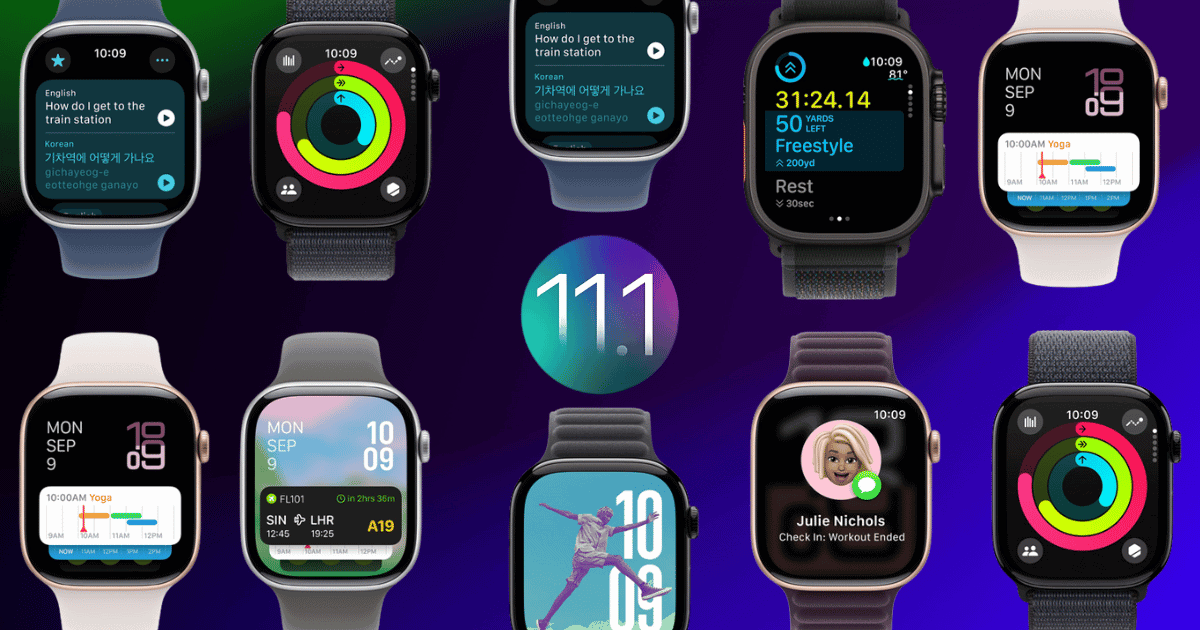
The release of watchOS 11.1 on October 28, 2024, introduces a host of innovative updates for Apple Watch users, designed to improve performance, health tracking, and personalization. As wearable technology continues to play a pivotal role in health, fitness, and lifestyle, Apple has made significant strides to refine the user experience and cater to diverse needs. In this article, we’ll explore the major improvements in watchOS 11.1 and what they mean for Apple Watch owners.
Performance Enhancements: Smoother and More Efficient
Apple WatchOS 11.1 is packed with performance upgrades that streamline daily use and enhance productivity. One of the most noticeable changes is the improved app load times, allowing users to navigate their watch’s features faster than ever. This boost in speed ensures a seamless experience, whether users are accessing fitness tracking, notifications, or third-party applications.
Battery life has also received a significant upgrade, with reduced drain even during intensive use. This optimization means users can enjoy longer intervals between charges, making it easier to keep track of health metrics and other data throughout the day. Apple has also improved connectivity, enabling more efficient syncing with iPhones and other Apple devices. Whether updating data in the background or sharing information between apps, these enhancements make Apple Watch a more responsive and reliable tool for users on the go.
Advanced Health and Sleep Tracking: A Step Forward in Wellness Monitoring
One of the standout features of watchOS 11.1 is its enhanced health and sleep tracking capabilities, which deliver a more accurate and holistic view of user health. Sleep tracking, for instance, has been upgraded to provide detailed insights into heart rate, respiratory rate, and sleep quality, offering a complete picture of nighttime health.
The introduction of sleep apnea detection is another pivotal update. By analyzing breathing patterns, watchOS 11.1 can now detect irregularities that may indicate sleep apnea, a common yet often undiagnosed condition. Through machine learning algorithms, the Apple Watch can alert users to potential issues, enabling them to take proactive steps to improve sleep health. Additionally, the Vitals app integrates seamlessly with this data, providing users with actionable insights and suggestions on enhancing their sleep and overall wellness.
For users looking to improve sleep quality, watchOS 11.1 includes personalized sleep goals and reminders that support consistent sleep patterns. The added focus on health aligns with Apple’s broader mission of promoting wellness, making the Apple Watch a valuable asset for users interested in tracking and improving their sleep habits.
Customizable Watch Faces: A New Level of Personalization
Personalization has taken center stage in watchOS 11.1 with nine new watch faces that give users creative control over how they display information. Unique options like the Flux, Reflections, and Pride Radiance watch faces provide fresh design choices that cater to various styles, enhancing both aesthetics and functionality.
One of the most impressive updates in watchOS 11.1 is the redesigned Photos watch face, which uses machine learning to curate images from a user’s photo library, allowing for easy filtering by categories such as people and pets. This watch face transforms the Apple Watch into a dynamic photo frame, bringing favorite memories to life with each glance at the wrist.
The Smart Stack feature further enhances customization by providing live activities and personalized widgets that are contextually relevant to the user. Based on usage patterns, this feature intelligently surfaces the most pertinent information, ensuring that users have quick access to their top apps and activities throughout the day. In addition to these options, watchOS 11.1 allows users to adjust elements like time size, layout, and font styles, making it easy to create a watch face that feels uniquely theirs.
For developers, expanded compatibility in watchOS 11.1 enables even more customization options, allowing for third-party watch faces to integrate seamlessly. This level of personalization is a first for Apple Watch, making it a more versatile and expressive tool for users to show off their style and preferences.
Improved Workout Metrics: Enhanced Tracking for Fitness Enthusiasts
Fitness tracking has long been a strength of the Apple Watch, and watchOS 11.1 continues to build on this foundation with refined workout metrics that support a comprehensive view of fitness progress. One of the key new features is the Training Load Measurement, which evaluates the cumulative impact of workouts over time. This metric is invaluable for anyone who wants to balance their training, as it provides insights into whether they may be undertraining or overtraining, which is essential for avoiding injuries and maintaining consistent performance.
Additionally, cardio-focused workouts now have access to Effort Metrics, which consider multiple personal data points to assess exercise intensity. This feature allows users to better gauge the effectiveness of their cardio sessions, enabling them to maximize results and adjust routines as needed.
Activity ring goals, which are already a popular feature among Apple Watch users, have also been upgraded with greater flexibility. Now, users can set customizable targets for each day of the week, allowing for personal goal adjustments based on specific training needs or lifestyle commitments. This flexibility supports users in meeting their fitness goals without feeling constrained by rigid targets, making the Apple Watch a more adaptable fitness partner.
Developer Tools and Enhanced Compatibility
For developers, watchOS 11.1 introduces a range of tools that facilitate the creation of more engaging and functional third-party applications. Expanded API access allows developers to integrate deeply with Apple Watch features, enabling a new wave of apps designed to take advantage of watchOS 11.1’s capabilities.
Hands-free scrolling has also been introduced, utilizing a double-tap gesture to improve navigation. This hands-free feature is particularly useful for users engaged in activities that require both hands, such as cooking or exercising, and reflects Apple’s commitment to intuitive usability.
Compatibility for watchOS 11.1 includes all Apple Watch models from Series 4 and later, ensuring that a broad range of users can take advantage of the new features. To install watchOS 11.1, users will need an iPhone running iOS 18.1, ensuring compatibility across Apple’s ecosystem. Apple has also provided comprehensive resources aimed at helping developers enhance user engagement and performance, supporting innovation within the Apple Watch app ecosystem.
Bug Fixes and Stability Improvements
In addition to feature enhancements, watchOS 11.1 addresses several bugs that have affected Apple Watch functionality in the past. Issues with syncing between devices, particularly iPhones and the Apple Watch, have been resolved, leading to smoother data sharing and improved connectivity. Heart rate monitoring, a crucial feature for fitness enthusiasts, has been refined to provide more accurate readings, improving user trust in the health data provided.
Notification delivery, which has sometimes experienced delays, has been optimized to ensure timely alerts and reminders, keeping users informed without interruption. Display errors on certain watch faces have also been corrected, ensuring that users enjoy a visually stable experience across different watch face designs. These bug fixes, alongside general stability improvements for third-party applications, contribute to a more reliable and enjoyable Apple Watch experience overall.
watchOS 11.1 – A Holistic Upgrade for Apple Watch Users
The release of watchOS 11.1 solidifies Apple’s commitment to advancing wearable technology by focusing on enhanced health tracking, performance, and personalization. This update not only enhances the Apple Watch’s functionality for fitness enthusiasts but also introduces greater customization and accessibility for users with varied interests and needs.
By delivering comprehensive health metrics, improved workout tracking, and versatile personalization options, watchOS 11.1 enables Apple Watch users to better understand and manage their health, fitness, and lifestyle. With robust support for developers and compatibility across a wide range of devices, the update fosters an ecosystem of innovation and engagement, setting the stage for future advancements in wearable technology.
For those seeking a versatile, health-focused device that adapts to their personal style, the Apple Watch running watchOS 11.1 is an indispensable tool, further establishing Apple’s leadership in the wearable tech industry.



















