
Uber’s New Features: Home Screen Widget, UberXXL, and More

As the holiday travel season approaches, Uber is rolling out a series of exciting new features designed to enhance user experience and streamline the ride-requesting process. Among these updates is a highly anticipated Home Screen widget for iPhone users, which promises to make requesting a ride quicker and more convenient than ever. In this blog post, we’ll explore the key features being introduced, including the UberXXL vehicle option, UberX Share at airports, and other enhancements that aim to improve the overall Uber experience.

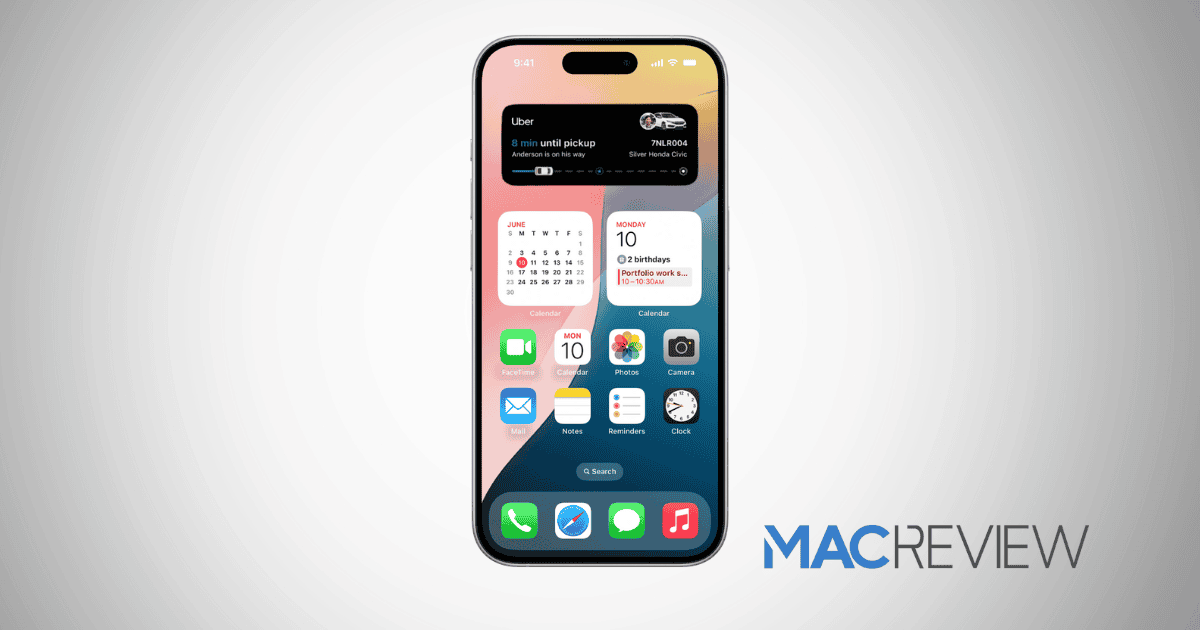
Home Screen Widget for iPhone

One of the standout features being introduced is the Home Screen widget for iPhone users. This new widget allows users to request a ride with just two taps, significantly reducing the time and effort required to book a ride. The widget can display saved addresses for home and work, making it easy for users to access their most frequented locations. Additionally, users can tap on a magnifying glass icon to quickly search for other addresses, providing flexibility for spontaneous trips.

While the widget was announced to be available soon, it may not be immediately visible to all users, as it will likely be included in an app update later today. This feature is particularly timely, as it coincides with the busy travel season in the U.S., which kicks off with Thanksgiving next week. The convenience of having a ride request option readily available on the home screen could be a game-changer for many users, especially during the hectic holiday travel period.

Introducing UberXXL

In addition to the Home Screen widget, Uber is also launching a new vehicle option called UberXXL. This feature is designed for travelers who need extra trunk space for their luggage, making it ideal for airport rides. With UberXXL, users can request a vehicle that offers larger trunk capacity, ensuring that they can transport their bags without hassle.

Currently, UberXXL is available at over 60 airports across the U.S., Canada, and select other countries, with plans for further expansion to additional airports in the future. This feature addresses a common pain point for travelers, as managing luggage can often be a stressful aspect of air travel. By providing a dedicated option for those with larger baggage needs, Uber is enhancing its service and catering to the specific requirements of its users.

UberX Share at Airports

Another noteworthy addition is the UberX Share option, which allows users to share rides with one other passenger at airports for discounted fares. This feature not only helps users save money but also promotes a more sustainable approach to travel by reducing the number of vehicles on the road. The UberX Share option is particularly appealing for travelers who are open to sharing their ride and can benefit from the cost savings.

This feature aligns with the growing trend of ride-sharing and carpooling, which has gained popularity in recent years as people seek more economical and environmentally friendly transportation options. By introducing UberX Share, Uber is tapping into this trend and providing users with more choices when it comes to their travel arrangements.

Enhancements Ahead of the Busy Travel Season

The introduction of these new features comes at a crucial time for Uber, as the holiday travel season is one of the busiest periods of the year. With millions of people traveling to visit family and friends, the demand for ridesharing services is expected to surge. By rolling out these enhancements, Uber is positioning itself to meet the increased demand and provide a seamless experience for its users.

In addition to the Home Screen widget, UberXXL, and UberX Share, the company has hinted at other upcoming features that will further improve the user experience. While specific details are still under wraps, it’s clear that Uber is committed to innovation and continuously enhancing its platform to better serve its customers.

MacReview Verdict

As Uber prepares for the busy travel season, the introduction of the Home Screen widget, UberXXL vehicle option, and UberX Share at airports represents a significant step forward in improving the user experience. These features not only make it easier for users to request rides but also address specific needs related to travel, such as luggage space and cost savings.

For iPhone users, the Home Screen widget is a particularly exciting development, as it streamlines the ride-requesting process and makes it more accessible. Meanwhile, the UberXXL option caters to travelers with larger baggage needs, ensuring that they can travel comfortably and conveniently. Lastly, the UberX Share option promotes a more sustainable approach to travel, allowing users to save money while reducing the number of vehicles on the road.

As we look ahead to the holiday season, it will be interesting to see how these new features are received by users and how they impact the overall Uber experience. With a focus on innovation and customer satisfaction, Uber is poised to make a significant impact in the ridesharing market this holiday season and beyond.


This is a recurring post, regularly updated with new information and offers.

The MacReview Yutube Channel

The MacReview Yutube Channel

Visit Our
Youtube Channel

Watch Anywhere, Anytime!

Factory workers in white lab coats and hairnets assemble Apple Mac mini computers on a conveyor belt in a United States manufacturing facility.

Last Updated: January 2026 | Reading Time: 8 minutes | Author: MacReview Editorial Team Apple’s iPhone 18 Pro is reportedly shaping up to be one of the most significant upgrades in recent years, with numerous rumored improvements spanning design, camera […]

Apple iPads displayed on a desk, one with a keyboard case and another upright, promoting a weekend deal to save up to $200

Last Updated: March 2026 | Reading Time: 3 minutes | Author: MacReview Editorial Team Amazon is offering substantial discounts on the M5 iPad Pro lineup this weekend, with savings of up to $200 across both 11-inch and 13-inch models. The […]

Reward your inbox with the TPG Daily newsletter img

Subscribe to Our Newsletter

Reward your inbox with the TPG Daily newsletter

Wireless printer with WiFi signal icon representing Apple AirPrint enterprise printing

Last Updated: February 2026 | Reading Time: 5 minutes | Author: MacReview Editorial Team When Apple introduced AirPrint in 2010, enterprise IT administrators largely dismissed it as a consumer-focused feature. More than a decade later, AirPrint has fundamentally transformed how […]

Password Utility Solves the FileVault Reboot Problem for Remote Mac Management

Last Updated: January 2026 | Reading Time: 4 minutes | Author: MacReview Editorial Team Managing remote Macs presents unique challenges, particularly when FileVault encryption creates accessibility issues during restarts. A new utility from Twocanoes Software addresses this long-standing problem for […]

SmallRig S70 wireless microphone kit with charging case and clip-on transmitters floating against a purple wave background

Last Updated: January 2026 | Reading Time: 4 minutes | Author: MacReview Editorial Team SmallRig has entered the wireless microphone market with the S70, a comprehensive audio solution reportedly priced at just $90. Unveiled at CES 2026, the kit targets […]

Introduction A recent rumor from China suggests that Apple is set to continue with the color-infused back glass technology in the upcoming iPhone 16, mirroring the aesthetic introduced in the standard iPhone 15 models. This development indicates a consolidation of […]

Man working on a laptop in a modern office at night with “Creator Studio” text and Apple logo above, plus floating creative app icons in the foreground.

Last Updated: February 2025 | Reading Time: 4 minutes | Author: MacReview Editorial Team Apple is reportedly planning to expand its subscription bundle offerings and introduce more paid features across its software ecosystem, following the launch of Apple Creator Studio […]

Two iPhones displaying an Apple Music promotion for 3 months free followed by $10.99 per month, placed in front of a laptop with a blurred music interface

Last Updated: February 2026 | Reading Time: 4 minutes | Author: MacReview Editorial Team Apple Music has publicly called out Spotify over its latest round of price increases, which began affecting subscribers in February 2026. The social media post highlights […]

A side-profile shot of a young man wearing headphones, looking intently at his smartphone screen which displays the DuckDuckGo logo. He is in a dimly lit indoor setting at night, with a blurred window and a small candle in the background.

Last Updated: February 2026 | Reading Time: 4 minutes | Author: MacReview Editorial Team DuckDuckGo has expanded its Duck.ai chatbot platform with a new real-time voice chat feature that maintains the company’s privacy-first approach. The optional feature allows users to […]

An iPhone and MacBook Pro sitting side-by-side on a desk, both displaying a new Siri chatbot interface. The screens show a text-based conversation asking about a schedule, with AI-generated responses and app icons. A glowing holographic network of data lines connects the two devices, symbolizing advanced AI integration.

Last Updated: April 2026 | Reading Time: 5 minutes | Author: MacReview Editorial Team Apple is reportedly planning to introduce a chatbot interface for Siri as part of iOS 27, marking a significant shift in strategy after previously dismissing this […]

In 2025, you’ll notice significant changes in Apple Arcade’s fan favorites, as exclusive updates aim to refine and enhance your gaming experience. Titles like WHAT THE CAR? and Hello Kitty Island Adventure are set to receive major gameplay improvements, alongside […]

With the anticipated release of Resident Evil 2 on iOS and macOS, set for December 10, 2024, fans of the franchise are on the edge of their seats. This iconic survival horror game promises a refreshed experience tailored for mobile […]

An iPhone resting on a wooden desk displaying the Snapseed Camera app interface. The screen shows manual sliders for Shutter, ISO, and Aperture, with a holographic film frame floating above the screen to represent film emulation filters like Classic Chrome and Noir.

Last Updated: April 2026 | Reading Time: 4 minutes | Author: MacReview Editorial Team Google has officially launched its Snapseed Camera feature for iPhone, transforming the popular photo editing app into a full-featured camera application with professional manual controls and […]

A smartphone on a wooden desk displaying the Peaks App interface with holographic data overlays showing heart rate graphs, sleep quality, and energy levels next to a cup of coffee and a yoga mat.

Last Updated: February 2026 | Reading Time: 4 minutes | Author: MacReview Editorial Team Apple Watch users generate extensive health data through the Apple Health app, but translating that information into practical guidance remains challenging. A new app called Peaks […]

Smart home control icon interface representing connected home automation and device management

Last Updated: February 2026 | Reading Time: 4 minutes | Author: MacReview Editorial Team Mac users looking for quick access to their smart home devices now have a compelling new option. Itsyhome is a menu bar application that brings comprehensive […]

Sign Up For Newsletter mobile

Catch The Latest

Sign Up For Newsletter

Apple Music is currently offering a compelling promotion that allows new subscribers to enjoy three

Apple’s highly anticipated Worldwide Developers Conference (WWDC) 2024 kicked off today, showcasing the tech giant’s

Been FaceTiming with my younger daughter Jordyn recently and were messing around with this new

iOS 18 is just around the corner, with Apple set to unveil the software update

Scroll to Top















