
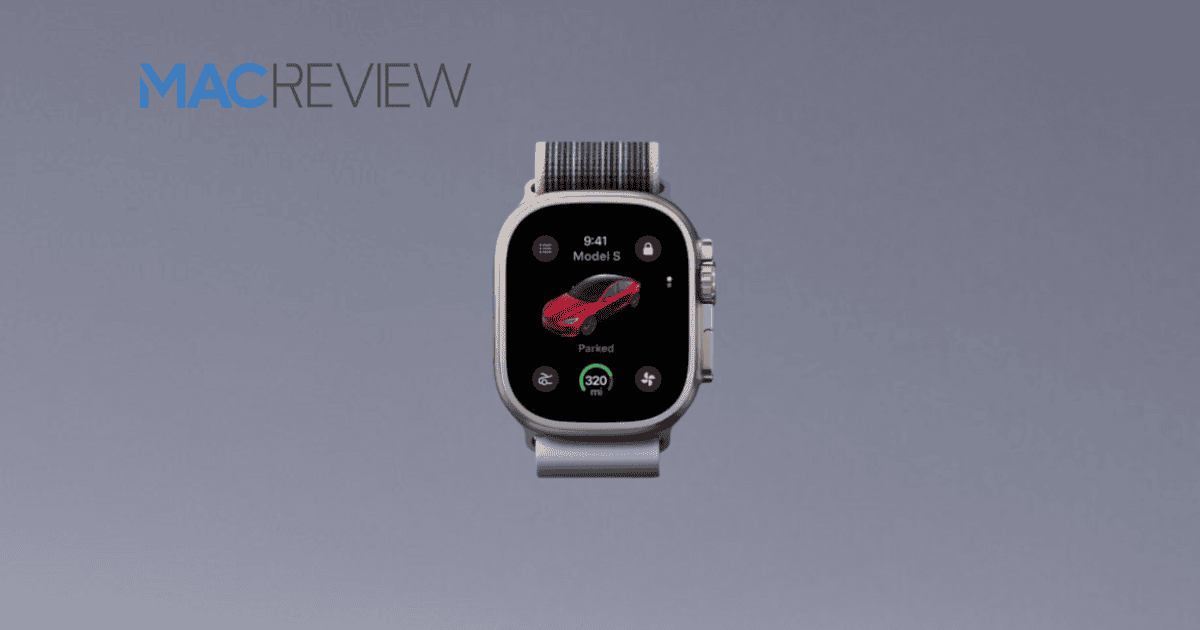
This month marks the introduction of Tesla’s Apple Watch app, a development that seeks to elevate the experience for Tesla owners by providing key functionalities at their fingertips. Users will have the ability to lock, start, and monitor their vehicles effortlessly, along with features like real-time battery monitoring and remote climate control. As we explore the implications of this innovation, it becomes essential to contemplate not only its compatibility with existing Tesla models but also the broader impact on user convenience and security. What does this mean for the future of automotive technology?
Overview of the App Features
The Tesla Apple Watch app is designed to revolutionize the way users interact with their vehicles. This innovative application allows users to lock, release, and start their Tesla directly from their wrist, streamlining the accessibility of essential vehicle functions.
With a focus on user convenience, the app displays the vehicle’s battery charge level, enabling owners to monitor their vehicle’s status at a glance, making sure they’re informed before beginning a journey.
In addition to basic functionalities, the app empowers users to remotely control climate settings, allowing for preconditioning of the vehicle before entering. This feature enhances comfort, especially in extreme weather conditions.
Moreover, the app provides quick access to Sentry Mode recordings, enabling users to view and save clips directly from their Apple Watch. Such integration enhances security and guarantees users can keep an eye on their vehicle’s surroundings even when away.
How to Set Up the App
Setting up the Tesla Apple Watch app is a straightforward process that begins with ensuring your devices are updated.
Apple Watch users must confirm that their Apple Watch is running the latest watchOS version, while the Tesla app on their iPhone should also be up-to-date. The watch app is automatically included in the iPhone companion app update.
After confirming the updates, open the Tesla app on your Apple Watch and log in using your Tesla account credentials. This step is essential for connecting your watch to your vehicle. The app will prompt you to authenticate your Apple Watch as a trusted device, granting it the functionality of a phone key for locking and releasing your Tesla.
Next, you can customize settings within the app to enable features such as activating climate control and monitoring your vehicle’s battery status directly from your wrist.
To complete the setup, familiarize yourself with the app’s interface, which provides quick access to features like trunk/frunk opening and overall vehicle status. This seamless integration enhances the driving experience while making essential controls easily accessible to Tesla owners.
Benefits of Using the App
Utilizing the Tesla Apple Watch app offers numerous advantages that enhance the overall ownership experience. One of the most significant benefits is the ability to monitor the vehicle’s battery charge directly from the Apple Watch, providing real-time awareness of the vehicle’s status without needing to access an iPhone. This feature guarantees that drivers can stay informed about their Tesla’s charge level, enhancing convenience.
Additionally, the app allows users to open and start their vehicle with ease, eliminating the need to carry an iPhone. This capability is particularly beneficial during workouts or outdoor activities, where carrying a phone may be cumbersome.
The app also provides remote access to climate control settings, enabling drivers to pre-condition their vehicle’s interior before entering, assuring comfort in varying weather conditions.
Furthermore, the Tesla Apple Watch app enhances security through the ability to view and save Dashcam and Sentry Mode clips, allowing easy access to recorded footage for sharing or insurance purposes.
With playful features like the whoopie cushion sound effect, the app not only maintains essential functionalities but also adds an element of fun to the Tesla ownership experience.
Compatibility With Tesla Vehicles
Compatibility with Tesla vehicles is a crucial aspect of the new Apple Watch app, which is designed to enhance the driving experience across the brand’s lineup. Set to launch as part of the 2024 Holiday Update, this innovative app will provide Tesla owners with a range of functionalities directly from their wrists.
One of the key features is the ability to use the Apple Watch as a phone key, allowing users to lock, open, and start their Tesla without needing to carry their iPhones. This level of convenience guarantees that drivers can access their vehicles effortlessly.
Additionally, the app empowers users to monitor their vehicle’s battery charge in real-time, independent of their iPhone, facilitating better planning and management of their electric vehicle’s energy needs.
The app’s compatibility has been confirmed for the Tesla Model 3, and it is expected to function seamlessly with other Tesla models, thereby enhancing the overall user experience across the brand’s vehicle lineup.
User Experience and Interface
With a focus on enhancing user convenience and engagement, the Tesla Apple Watch app offers a seamless interface that empowers drivers to manage their vehicles efficiently. This innovative app provides a native experience, allowing users to monitor their vehicle’s battery charge independently from their iPhone, thereby enhancing convenience during daily operations.
The user interface is designed for intuitive navigation, enabling users to control essential functions such as locking, releasing, and activating climate control directly from their Apple Watch. Real-time notifications and alerts further improve user engagement, ensuring that drivers remain informed about their vehicle’s status without needing to access their smartphone.
Additionally, the app incorporates features that enhance the overall user experience, such as the ability to save and share Dashcam and Sentry Mode clips. This integration of media management into the watch interface streamlines the process, making it more accessible and user-friendly.
Furthermore, playful elements like the whoopie cushion sound effect for passenger seats add a lighthearted touch, making interactions with the app more enjoyable.
Security Features of the App
The Tesla Apple Watch app places a strong emphasis on security, guaranteeing that users can manage their vehicles with confidence. The app utilizes Bluetooth signals to establish secure communication, allowing users to lock, open, and start their vehicles directly from their wrist. One of the standout security features is the Walk-Away Door Lock system, which automatically secures the doors when the user leaves the vehicle.
Additionally, users can register up to three trusted phone keys for their Tesla Model 3, assuring that only authorized devices can control the vehicle. The app also supports NFC-based car opening, akin to existing key cards, providing an extra layer of convenience and security. Enhanced security features include the requirement for authentication during device registration, assuring that only verified devices can access vehicle controls.
| Security Feature | Description |
|---|---|
| Bluetooth Communication | Enables secure locking, opening, and starting from the watch. |
| Walk-Away Door Lock | Automatically secures doors when the user walks away. |
| Trusted Phone Keys | Allows registration of up to three authorized devices. |
| NFC-based Car Unlocking | Offers seamless opening similar to key cards. |
| Device Authentication | Guarantees only verified devices can control the vehicle. |
Future Updates and Enhancements
Tesla is poised to elevate the functionality of its Apple Watch app through a series of forthcoming updates aimed at enhancing user experience and vehicle control.
These enhancements will leverage user feedback and evolving technology trends, ensuring that the app for Apple Watch remains at the forefront of innovation.
Anticipated features include:
- Personalized Alerts: Users will have the ability to set maintenance reminders directly through the app, ensuring their vehicle stays in prime condition.
- Sentry Mode Recordings: Future updates may include easier access to view and manage sentry mode recordings, improving security oversight.
- Seamless Integration: Enhanced functionalities could allow for cross-device interactions with other Apple products, creating a more cohesive ecosystem.
- Safety Notifications: The app may introduce improved safety features, such as notifications for nearby pedestrians or obstacles, reinforcing Tesla’s commitment to driver and pedestrian safety.
These updates are designed to make the Apple Watch app not just a convenient tool but a crucial component of the Tesla driving experience, enhancing the overall usability and safety of the vehicle.
Conclusion
The introduction of Tesla’s Apple Watch app represents a significant advancement in the integration of automotive technology and wearable devices. With capabilities such as remote vehicle control and real-time monitoring, this app enhances user convenience and security. Significantly, studies indicate that 75% of consumers prefer using mobile applications for vehicle management, highlighting the demand for such technological innovations. This app not only meets consumer expectations but also sets a benchmark for future developments in automotive smart technology.



















