
Start with photos and video. On a full iPhone they almost always take more room than every app combined, and the fastest real gain is deleting a few large videos and then emptying the Recently Deleted album, which holds everything for 30 days and keeps consuming the space until you clear it.
Key Takeaways
- Deleting photos frees nothing for 30 days unless you also empty Recently Deleted, which is where they go and where they keep sitting.
- With iCloud Photos switched on, deleting a photo on your iPhone deletes it from every device signed in to the same Apple Account. This is not a device-only cleanup.
- Optimize iPhone Storage does not delete anything and does not free space on demand. It swaps full-resolution files for smaller local copies only when your iPhone actually needs the room.
- Offloading an app removes the app but keeps its documents and data, so reinstalling puts you back exactly where you were.
- System Data has no delete button. Apple defines the category as caches, Siri voices, fonts, dictionaries and the Spotlight index, and it shrinks on its own when space runs short.
Check What Is Actually Using the Space First
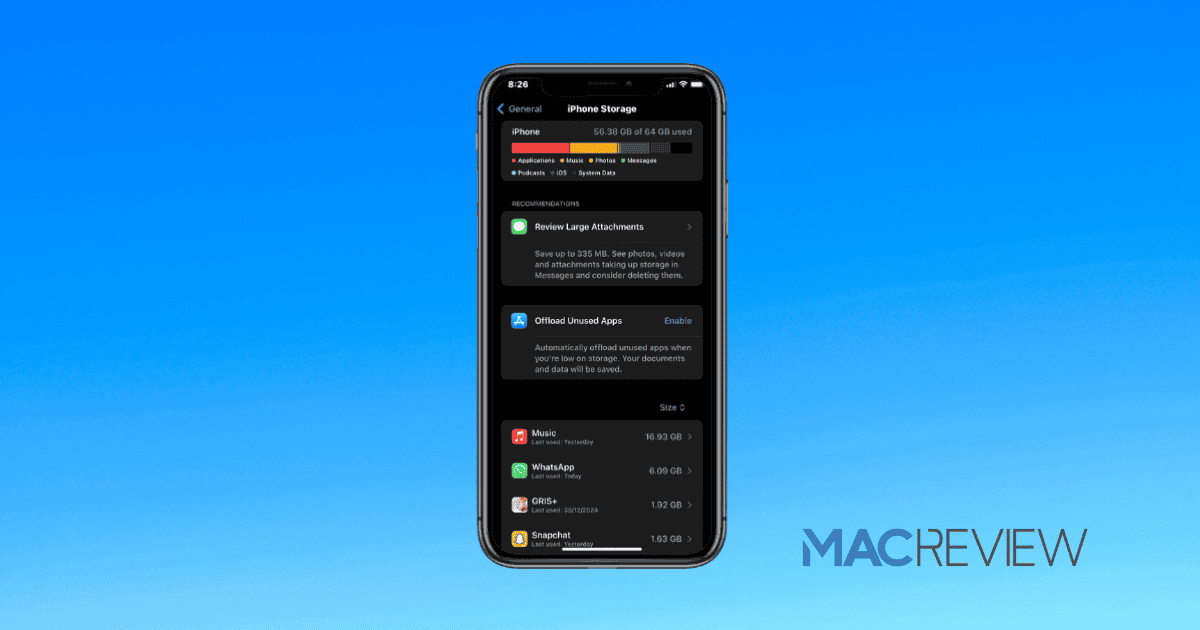
Go to Settings > General > iPhone Storage. You get a colored bar across the top and, below it, every app sorted by size with the largest first. Apple surfaces its own recommendations there too, worth reading before you delete anything by hand.
The ordering below holds true for most people. It is not a law. If that list shows one game eating 14 GB, that game is your biggest win and the rest of this page can wait.
The Steps, Ranked by How Much They Recover
1. Videos, then photos
This is the big one, and it is rarely close. A phone that shoots 4K video accumulates gigabytes a month without the owner noticing, and a handful of long clips will usually free more than every other step on this list put together.
In Photos, use the Videos album rather than scrolling the main library. Old screen recordings, the twelve-minute clip of a school concert you already shared, duplicate takes of the same thing. Those are the ones. A single still is worth a rounding error next to any of them, so do not spend an evening on individual photos.
2. Empty Recently Deleted
Nothing you deleted in step one has actually gone. Deleted photos and videos move to a Recently Deleted album and sit there for 30 days before iOS removes them, which is a good safety net and a very common reason people decide that deleting photos does not work.
Open Photos, go to Recently Deleted under Utilities, unlock it with Face ID, then select what you want gone and delete it permanently. With iCloud Photos on you are asked whether to delete from all devices. Say yes if you meant it, because the alternative leaves the originals in iCloud.
3. Offload unused apps
Offloading deletes the app while keeping its documents and data. That distinction is the whole point: the icon stays on your Home Screen with a small cloud badge, and tapping it reinstalls the app with your logins and saves intact.
You will find it in the same iPhone Storage screen, both per app and as a blanket recommendation covering anything you have not opened in a long time. On a phone with seventy apps this typically recovers a few gigabytes. On a phone with fifteen it recovers almost nothing.
4. Downloaded podcasts, music and video
Podcasts are the quiet offender, because the app is set to download episodes automatically and most people never turn that off. A year of a daily show is a large number of files nobody will ever play again.
In Podcasts, go to Library, tap Downloaded, then use the More button and choose Remove All Downloads. Then stop it happening again. Settings > Apps > Podcasts has an Automatically Download setting you can switch off, and a Remove Played Downloads toggle that clears episodes 24 hours after you finish them. Turn that on and the problem never returns. Apple Music and the streaming apps hide the same trap, and downloaded films are the worst of them.
5. Messages attachments
A ten-year iMessage history full of photos, videos and voice notes can run to several gigabytes. Do not scroll through conversations. Open Settings > General > iPhone Storage, tap Messages, and review large attachments in bulk from the categories there.
Then set an expiry. In Settings > Apps > Messages, Keep Messages can be set to 30 Days or 1 Year instead of Forever, and iOS will prune the older ones automatically. Be deliberate about this. It deletes the conversations themselves, not just the attachments, and there is no undo.
6. Safari cache
Last, and last for a reason. Clearing Safari’s cache usually recovers a few hundred megabytes at most, which is a rounding error next to a single 4K video.
If you want it gone anyway, go to Settings > Apps > Safari > Clear History and Website Data and pick a timeframe. It removes history, cache and cookies, and does not touch your AutoFill information. Treat it as a privacy step that frees a little space, not a storage strategy.
Why Does Deleting Photos Not Free Up Space?
Usually one of two reasons, and they trip up different people. The first is Recently Deleted, covered above. The second is that iCloud Photos was already storing small copies on your phone, so the photos you are deleting were never taking much room in the first place.
Here is the distinction that causes most of the confusion. iCloud Photos is synchronization, not backup. There is one library, and your iPhone shows you a window onto it. When you delete a photo on the iPhone, Apple’s documentation is unambiguous: it is deleted on every other device signed in to the same Apple Account. People who think they are tidying their phone are frequently deleting the only copy of something from their Mac and iPad at the same time.
Optimize iPhone Storage is the setting people misunderstand next. Apple’s description is precise: full-resolution photos and videos live in iCloud, and space-saving copies are kept on your device when needed. That last phrase is doing a lot of work. Switching it on does not sweep through your library and shrink everything this afternoon. iOS decides, over time, and only as free space gets tight.
The opposite setting, Download and Keep Originals, is what fills phones. With a large library and a 128 GB iPhone that is almost certainly your problem, and switching is the right long-term fix even though it will not help you in the next five minutes.
What Is System Data, and Can You Delete It?
You cannot delete it directly, and there is no hidden setting that does. System Data is the catch-all bar segment for everything iOS cannot file under an app.
Apple actually documents what goes in there, which is more than most explanations manage. The category covers non-removable mobile assets such as Siri voices, fonts and dictionaries, along with logs and caches that cannot be removed, the Spotlight index, and system data including the Keychain and the CloudKit database. The separate System entry is the operating system itself, and its size varies by model.
In practice it swells with caches and shrinks again when iOS needs the room, which is why it looks alarming one week and normal the next. Restarting sometimes clears a chunk. The only reliable way to force it down is a backup, erase and restore, which is a wildly disproportionate response to a bar chart. Unless it has passed roughly a fifth of your capacity and stayed there for weeks, ignore it and go back to step one.
Frequently Asked Questions
Does deleting an app also delete its data?
Yes. Deleting removes the app and its documents and data together, which is exactly what separates it from offloading. Offload when you might want the app back and care what is inside it. Delete when you are finished with it. Anything the app keeps in the cloud, such as a streaming account, comes back regardless.
Do photos stored in iCloud count against my iPhone storage?
They count against iCloud storage, not iPhone storage. What sits on the phone is either the full-resolution file or a smaller local copy, depending on your Photos setting. That is why an iPhone can be full while iCloud has room to spare, and why the two warnings mean different things.
Should I just buy more iCloud storage instead?
If the problem is a large photo library rather than app clutter, yes, and it is not close. Extra iCloud storage with Optimize iPhone Storage solves the recurring version of this permanently, while an afternoon of deleting buys a few weeks. A one-off app problem is a different matter.
MacReview Verdict
Almost every full iPhone is full of video. If you do one thing, open the Videos album, delete the ten longest clips you will never watch, and empty Recently Deleted. That sequence beats the entire rest of this page for most people, and it takes four minutes.
Skip the ritual cleanups. Clearing Safari’s cache, force-quitting apps and staring at System Data are things people do because they feel productive, not because they recover meaningful space.
And if you are doing this every couple of months, stop treating it as a cleaning problem. It is a capacity problem. A larger iCloud tier with Optimize iPhone Storage switched on ends it rather than postponing it.



















