
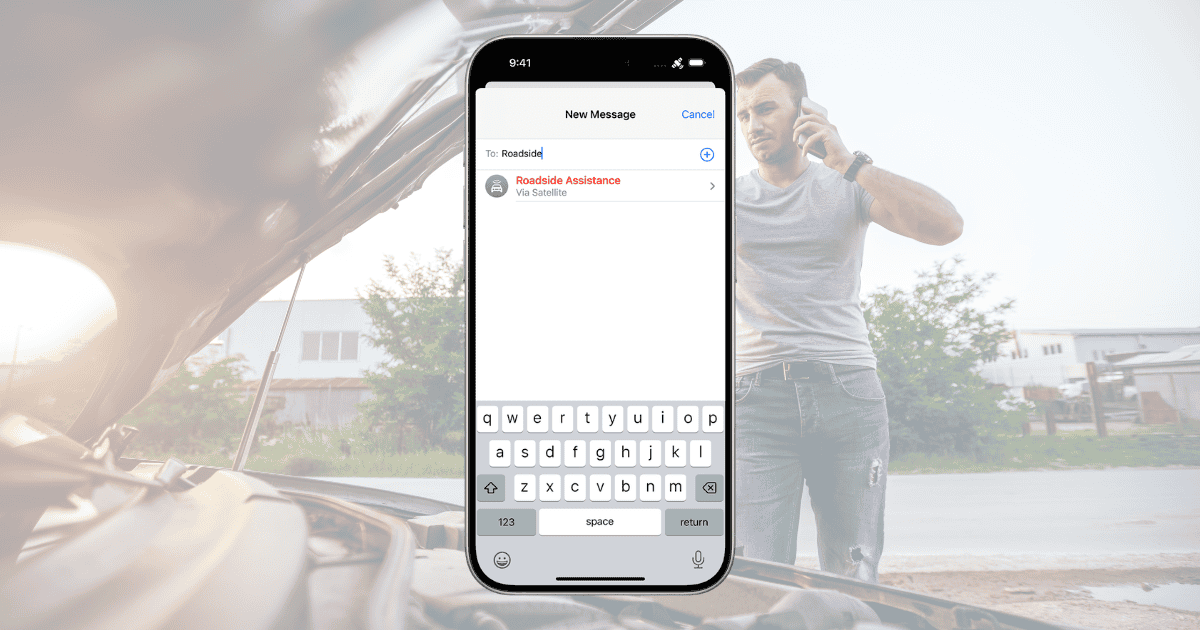
The launch of Apple’s Satellite Roadside Assistance feature in the UK, available to iPhone 14 users and later models, represents a groundbreaking innovation in mobile safety technology. With the increasing demand for off-grid connectivity, this service empowers drivers to request roadside help even in the most remote areas, where cellular or Wi-Fi coverage is unavailable. By leveraging satellite technology, Apple ensures that drivers can access critical assistance for emergencies such as flat tires, lockouts, or running out of fuel.
However, this exciting development also raises questions about the broader implications for the future of roadside safety. As Apple’s new service integrates with existing roadside assistance providers like Green Flag, motorists are now more connected than ever. But how does this impact user convenience, emergency response, and long-term adoption of mobile satellite technology?
What is Satellite Roadside Assistance?
Apple’s Satellite Roadside Assistance feature is designed to address a common problem faced by drivers: the inability to connect with help in remote areas lacking cellular or Wi-Fi coverage. The service, now available in the UK, leverages satellite technology to allow iPhone 14 or later users to communicate directly with Green Flag, a leading UK roadside assistance provider, when emergencies occur.
Here’s how it works:
- Satellite Connectivity: Users can send a roadside assistance request even in off-grid locations by typing “roadside” in the Messages app. The system establishes a satellite connection, ensuring drivers are never too far from help.
- Partnership with Green Flag: By working with one of the UK’s most reliable breakdown services, Apple offers a comprehensive solution for drivers dealing with unexpected issues.
- Free for Two Years: For those who purchase an iPhone 14 or later, the first two years of satellite roadside assistance come at no extra cost, with non-members paying on a per-use basis thereafter.
Key Features of the Service
Apple’s Satellite Roadside Assistance is packed with features that aim to make driving in remote areas safer and more convenient. Here are some of the standout aspects:
- Satellite-Based Communication: The ability to request help via satellite ensures that users are not dependent on traditional network coverage.
- Green Flag Partnership: Access to experienced roadside professionals guarantees quality support.
- Easy Activation: The service is triggered through a simple message in the iPhone’s native Messages app, eliminating the need for complex apps or services.
- Service Inclusions: Users can request help for common issues such as flat tires, lockouts, or fuel shortages.
- Extended Coverage: With Apple expanding this feature beyond the U.S., UK drivers now benefit from enhanced off-grid safety.
How to Use Satellite Roadside Assistance
Utilizing this service is simple and intuitive, making it accessible even in stressful situations. Here’s a step-by-step guide to getting assistance:
- Open Messages App: When experiencing car trouble, open your iPhone’s Messages app and type “roadside” in the recipient field.
- Clear Sky Requirement: Ensure you’re in an open area with a clear view of the sky to enable optimal satellite communication.
- Follow Prompts: The app will walk you through a set of instructions to send your request for help. This includes selecting the type of roadside assistance needed, such as a tire change, lockout service, or fuel delivery.
- Satellite Connection: The service will connect to a satellite to send your request, bypassing the need for cellular or Wi-Fi connectivity.
This simple process can be a lifesaver in remote locations, ensuring that help is just a message away.
Advantages of Satellite Roadside Assistance
The advantages of Apple’s Satellite Roadside Assistance are numerous, especially for drivers who often travel through rural or remote areas:
- Reliable Off-Grid Access: Satellite technology ensures you can access help even in areas with no signal.
- Convenient and Easy to Use: The straightforward messaging system makes requesting assistance easy, even under stressful conditions.
- Free for Two Years: For eligible iPhone users, the service is free for the first two years, offering peace of mind without additional costs.
- Comprehensive Support: By partnering with Green Flag, Apple guarantees quality assistance for a wide range of vehicle issues.
These benefits highlight why this service could become a go-to feature for drivers across the UK.
Impact on UK Motorists
The introduction of Satellite Roadside Assistance in the UK is expected to have far-reaching implications for motorists. By providing connectivity in off-grid areas, Apple is reshaping expectations for roadside support, especially in the UK’s varied landscapes where cellular dead zones are common.
- Increased Safety: For drivers traveling through rural regions, this service ensures they are never without the ability to request help, reducing the risks associated with breakdowns in isolated areas.
- Environmental Considerations: The feature could encourage more exploration of remote areas, knowing that help is accessible. However, it may also require further infrastructure development to manage increased travel in such regions.
- Enhanced Reliability: Partnering with Green Flag adds a layer of reliability, ensuring that users are connected to a trusted provider.
While the service is free for two years, the eventual pay-per-use structure will likely encourage long-term customer retention and continued use of this valuable resource.
Potential Challenges
Despite the many benefits, the service does present some challenges and considerations:
- Satellite Connectivity Issues: While the system works in off-grid areas, clear skies are necessary for the satellite connection. Dense forests or heavy weather conditions could disrupt service.
- Cost for Non-Eligible Users: After the two-year period, users may face pay-per-use charges, which could be a deterrent for some.
- Device Compatibility: Only iPhone 14 and later models with iOS 17 or higher can access the service, limiting its availability to older iPhone users.
Addressing these challenges will be crucial to ensuring the long-term success of the service.
MacReview Verdict
Apple’s Satellite Roadside Assistance is likely just the beginning of what could be a broader integration of satellite-based services in consumer tech. As more drivers gain access to off-grid connectivity, we can expect other mobile safety innovations to follow. In the future, satellite technology may extend to other services, such as emergency medical support or vehicle tracking, further enhancing user safety on the road.



















