
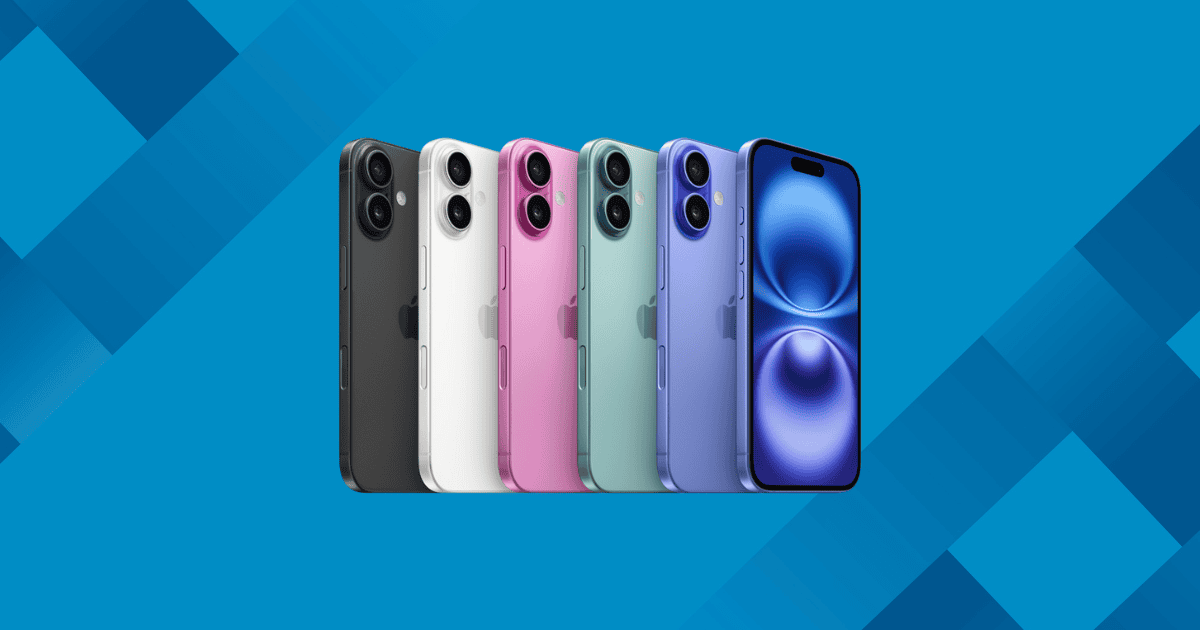
Apple has officially unveiled the iPhone 16 and iPhone 16 Plus, featuring a range of pro-level features at a mainstream price. From the A18 chip to the innovative Action Button and Camera Control, these models bring significant performance enhancements and camera upgrades, making them strong contenders for those seeking a premium experience without the premium price tag.
Key New Features of the iPhone 16 and iPhone 16 Plus
- A18 Chip for Enhanced Performance:
The iPhone 16 is powered by the A18 chip, which brings faster processing speeds and Apple Intelligence support for AI-driven tasks like Siri, Visual Intelligence, and Photo Clean Up. - Action Button:
Replacing the mute switch, the Action Button is a customizable shortcut for various functions such as voice memos, camera launch, or even launching apps. It was first introduced with the iPhone 15 Pro, but now iPhone 16 users can enjoy this convenience as well. - Camera Control Button:
Taking smartphone photography to a new level, the Camera Control button mimics a physical shutter and adds gesture-based controls for adjusting zoom, exposure, and more. Positioned on the right side, it delivers a true camera-like experience, helping you capture better shots effortlessly. - Enhanced Ultra Wide Camera with Macro Support:
The iPhone 16 introduces macro photography to the standard model for the first time, making it possible to capture detailed close-ups. Whether you’re photographing flowers or intricate objects, the iPhone 16’s ultra wide camera now offers unprecedented clarity. - Photographic Styles and Dynamic Camera:
Apple has revamped its Photographic Styles, improving how the camera handles skin tones, shadows, and highlights. You can now easily switch between styles in real-time using the Camera Control button. - Vibrant Color Palette and Redesigned Camera Layout:
The iPhone 16 comes in striking colors such as Ultramarine, Pink, and Teal. The camera layout has been changed from diagonal to vertical, supporting Spatial Video and Photo capture for the Vision Pro headset.
Design Changes in the iPhone 16
Though the iPhone 16 retains a similar design to its predecessor, the iPhone 15, Apple has made several changes to enhance both style and functionality:
- Bolder Colors:
The iPhone 16’s new color palette includes Ultramarine, Pink, and Teal, which have been described as more vibrant and eye-catching. - Vertical Camera Layout:
Moving away from the diagonal arrangement, the iPhone 16 adopts a vertical camera stack, allowing for better Spatial Video and Photo capture, a feature that will be especially useful with the Vision Pro headset.
According to Tom’s Guide’s John Velasco, the iPhone 16 looks more stylish than the iPhone 16 Pro, with the bold colors making a strong visual impact.
The Action Button and Camera Control: Next-Level Interaction
Two standout features in the iPhone 16 are the Action Button and Camera Control. These features are designed to make daily tasks and photography easier and more intuitive.
- Action Button:
The Action Button replaces the traditional mute switch and can be customized to perform a range of tasks, from launching voice memos to activating shortcuts. - Camera Control:
This new capacitive button mimics a physical camera shutter and integrates gesture controls, making it simple to adjust settings like zoom and exposure. It brings a level of precision to smartphone photography that feels much more camera-like than in previous models.
TechRadar’s Philip Berne praised the Camera Control button, noting its ability to detect pressure and replicate the feel of a shutter button on modern mirrorless cameras.
Apple Intelligence: AI Power for the Future
The iPhone 16 will soon benefit from Apple Intelligence, Apple’s response to the growing integration of AI in mobile devices. While these features will be available through future updates, the A18 chip already supports the foundational capabilities for Apple Intelligence:
- Visual Intelligence:
This feature is Apple’s answer to Google Lens, allowing users to quickly search for items by taking photos. - Siri Enhancements:
Apple has made Siri more conversational and useful, thanks to the AI advancements supported by the A18 chip.
While some critics, like Tom’s Guide’s John Velasco, feel Apple is catching up to competitors like Google, they also agree that Apple Intelligence will bring major improvements once fully integrated.
Camera Improvements: A New Era of iPhone Photography
The iPhone 16 significantly enhances its camera system, particularly with the new ultra wide lens that supports macro photography. The revamped Photographic Styles also make it easier to create dramatic, vibrant images with minimal effort.
Key Camera Upgrades:
- 48MP Fusion Camera:
The main camera delivers stunningly clear photos, while the 12MP ultra wide camera now allows for detailed macro shots. - Improved Low-Light Performance:
The iPhone 16 handles low-light environments better, as noted by CNET’s Lisa Eadicicco, who compared it to competing smartphones like the Google Pixel 9.
MacReview Verdict
With the iPhone 16 and iPhone 16 Plus, Apple has successfully combined pro-level features with a mainstream price point. From the A18 chip and Action Button to the Camera Control and improved camera system, this lineup offers a lot of value to those looking for an iPhone that delivers performance, style, and cutting-edge technology. Whether you’re a photographer, a power user, or someone who simply wants an enhanced iPhone experience, the iPhone 16 is built to impress.



















