
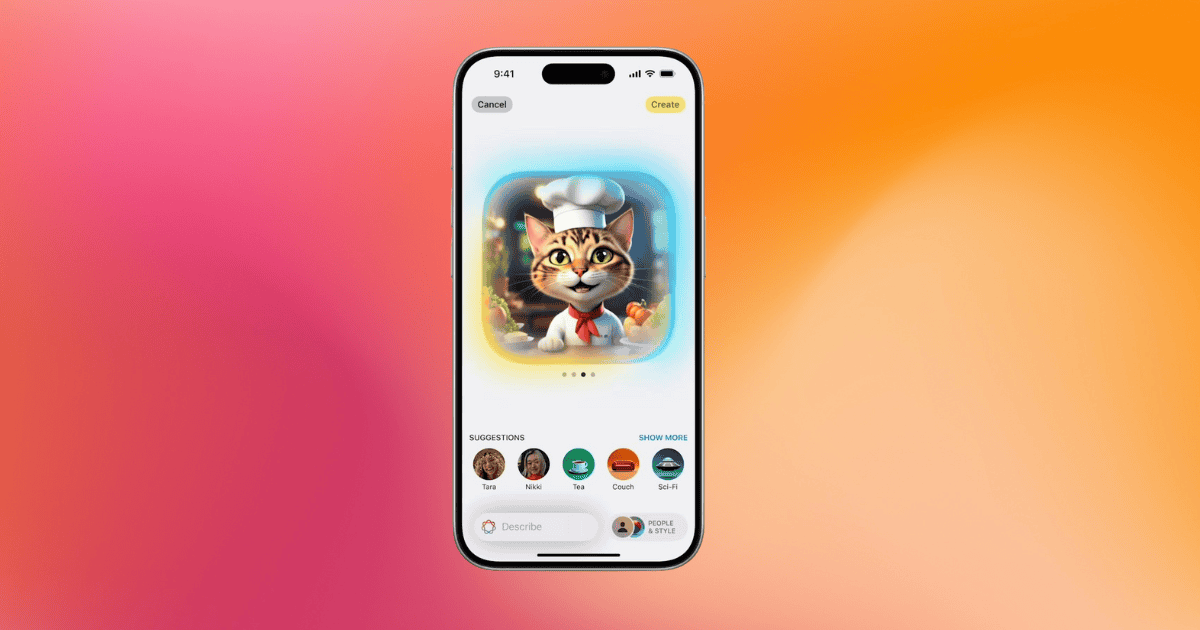
The iOS 18.2 Beta marks a significant leap in Apple’s AI-driven features, particularly with the introduction of the Image Playground. This exciting new feature allows users to create custom Apple Intelligence images via text prompts. Available on devices like the iPhone 15 Pro, Pro Max, and the iPhone 16 series, this tool brings new levels of creative expression to Apple’s ecosystem, particularly in visual storytelling and communication. The Image Playground integrates seamlessly with the Messages app, making it a game-changer for users seeking to generate high-quality, personalized images quickly and efficiently.
Overview of iOS 18.2 Beta
The iOS 18.2 Beta is packed with innovative features designed to enhance how users interact with their iPhones. A key highlight of this release is the Image Playground, which allows users to create images from scratch by typing descriptive text prompts or selecting from theme shortcuts. With a simple tap on the Messages app, users can generate stunning visuals in no time. Here’s what makes this feature stand out:
- Text-to-Image Capabilities: Apple’s AI interprets text inputs to create images that match the given descriptions.
- Personalized Emojis with GenMoji: Another noteworthy feature is GenMoji, which lets users craft custom emojis, giving them control over attributes like gender, age, and skin tone for a more personal touch.
- Apple Intelligence Integration: With these tools, users can access AI-driven image generation that elevates their creative experiences while safeguarding privacy and performance.
Although these features are in beta, the capabilities they offer point toward a future where customization and creativity are at the forefront of Apple’s user experience.
Key Features of Image Playground
The Image Playground allows users to craft images quickly and easily, whether for personal or professional use. Here are the key features that define this powerful tool:
- Customization: Users can switch between different styles, such as animation or illustration, by using the intuitive + icon in the Messages app or via a dedicated app.
- High-Resolution Output: The images generated through the Image Playground are of high quality, with a resolution of 1024×1024, ensuring they look sharp across various platforms.
- Effortless Sharing: Once an image is complete, users can tap Done to access options for sharing, editing, or saving their creation in the Image Playground library.
Though still in beta, the Image Playground offers an intuitive way for users to enhance their creative expression. However, there are some limitations, such as the current restriction to creating images with only one person at a time. Despite these constraints, the feature opens the door to a new level of personalized image creation.
Step-by-Step Setup Guide for Apple Intelligence Image Creation
If you’re eager to explore the Apple Intelligence image creation features in iOS 18.2 Beta, follow these steps to get started:
- Ensure Compatibility: Before diving in, make sure your iPhone is compatible with iOS 18.2 Beta, available through the Apple Developer Program.
- Request Early Access: Upon installing the beta, you may receive a splash screen prompting you to request early access to the Apple Intelligence Image Creation feature. If not, you can locate this option in the Settings app.
- Open the Image Playground: Launch the Messages app and tap the + icon to access the Image Playground. Alternatively, open the dedicated app for more advanced features.
- Start Creating: Enter your text prompts or select from theme shortcuts to begin generating images. Once the image is ready, tap Done to finalize it and explore sharing or editing options.
By following this guide, you can unlock the full potential of Apple Intelligence image generation, creating visuals that reflect your unique vision.
Using the Image Wand in Notes
Taking creativity even further, the Image Wand feature in the Notes app allows users to turn their written or drawn content into engaging images. This feature lets users circle words or sketches, and the Image Wand will generate relevant images directly in the notes.
Here’s how it works:
- Transform Text and Sketches: Circle a word or a rough sketch, and the Image Wand will create an image that visually represents the concept. This feature is perfect for making note-taking more engaging.
- Tailored Image Editing: Once the image is generated, users can edit it to ensure it aligns with the content’s message, adding a layer of creativity and personality to their notes.
- Collaboration and Sharing: Enhance your notes with visuals and share them with collaborators or friends, making projects more dynamic and visually appealing.
This added functionality in iOS 18.2 Beta expands creative possibilities and integrates image generation into everyday tasks.
Generating Apple Intelligence Images
To generate images within the Image Playground, users need to enter a descriptive text prompt or select a theme. Whether you’re describing a landscape, a person, or an abstract concept, the AI works to produce an image that reflects the given input.
Key steps for using the Image Playground:
- Text Prompts: Enter clear, specific descriptions to guide the AI in creating images that match your vision.
- Styling: Switch between animation and illustration styles to add diversity to your creations.
- Editing and Sharing: Once your image is generated, tap Done to access options for sharing or further customization.
This simple yet powerful interface allows users to bring their creative ideas to life effortlessly.
Tips for Best Results
For the best outcomes when using the Image Playground, it’s essential to provide clear, detailed prompts that guide the AI in generating the desired image. Here are some practical tips:
- Be Specific: Clear and descriptive prompts lead to more accurate results. Mention key details like colors, themes, or styles to fine-tune your creations.
- Explore Theme Shortcuts: Use pre-set themes to experiment with different visual styles, helping you discover new ways to express your creativity.
- Focus on One Subject: The current limitations restrict the creation to one person per image, so ensure your prompts are focused on individual subjects for the best output.
By applying these tips, users can make the most of the Image Playground’s capabilities and create visually compelling images.
Potential Limitations and Considerations
While the Image Playground in iOS 18.2 Beta offers an exciting way to generate personalized images, there are a few limitations and considerations to keep in mind:
- One-Person Limitation: Currently, the tool only supports creating images with a single subject, limiting more complex compositions.
- Performance Hiccups: As with any beta release, users may encounter performance issues such as lag or bugs that could affect the experience.
- Device Compatibility: Ensure that your iPhone is compatible with the iOS 18.2 beta to fully explore these features.
By understanding these limitations, users can better navigate the Image Playground and produce high-quality images despite the constraints.
MacReview Verdict
The iOS 18.2 Beta brings a suite of features that push the boundaries of creativity on the iPhone, with the Image Playground at its core. This tool offers users the chance to craft unique, high-resolution images with minimal effort. Despite a few limitations, such as the one-person restriction, the ability to create images via text prompts represents a major leap forward in mobile creativity. As this feature evolves, it promises to unlock even more potential, making the future of Apple Intelligence even brighter.



















