
How to Use Charging Limit Options in iOS 18

Apple has taken another step toward extending iPhone battery life with the release of iOS 18, particularly for iPhone 15 and 16 models. With the introduction of customizable charging limit options, users can set their iPhone to pause charging at specific percentages, reducing stress on lithium-ion batteries. This update allows users to optimize their charging habits while preventing overcharging, thus prolonging battery health and lifespan.

In this guide, we will explore how to use these features, discuss compatibility, and offer tips for optimizing your iPhone’s battery longevity.

What’s New in iOS 18 Charging Limits?

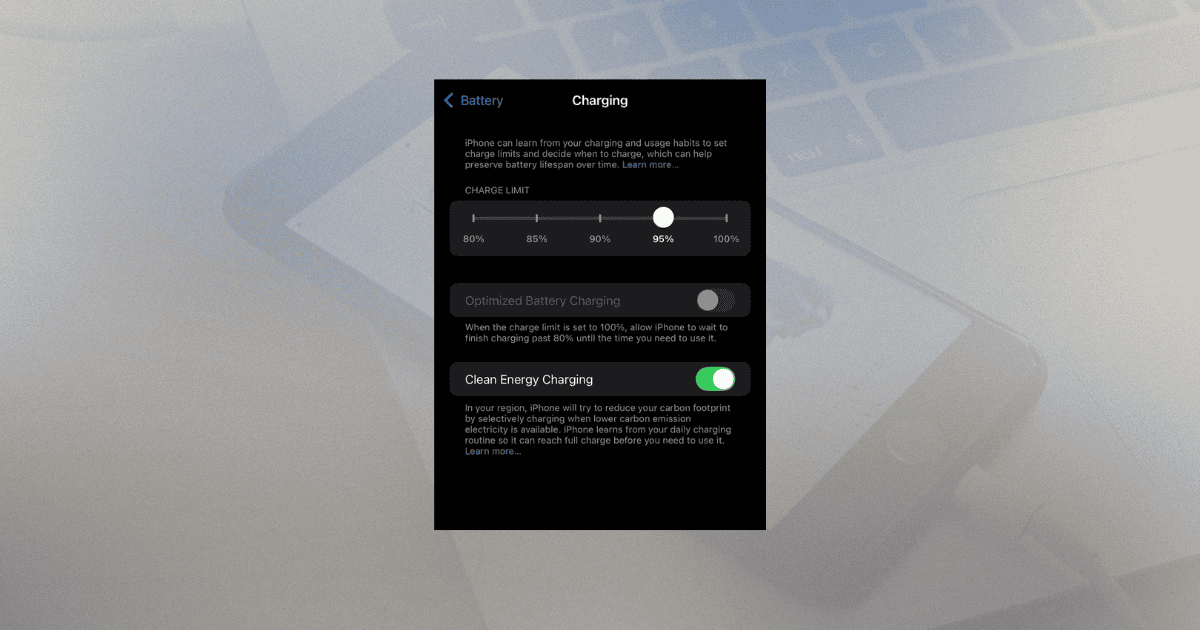
iOS 18 expands charging limit options, allowing users to set their charging cap at 80%, 85%, 90%, or 95%. The iPhone will pause charging once it reaches the selected limit, reducing the risk of battery degradation over time.

Key Features of Charging Limits:

  • Custom Charge Limits: Select from 80%, 85%, 90%, or 95% as the maximum charge level.
  • Optimized Battery Charging: The system learns your charging habits and provides recommendations for optimal charging routines.
  • Extended Battery Lifespan: Reducing time spent at 100% charge helps maintain long-term battery performance.

With these enhancements, you can improve your iPhone’s battery health, particularly if you frequently leave your device charging overnight.

How to Enable Charging Limits in iOS 18

Activating and customizing your charging limits is simple. Follow these steps to set up your iPhone for optimal battery performance:

  1. Open the Settings app and tap Battery.
  2. Select Battery Health & Charging.
  3. Enable Optimized Charging, and then choose a Maximum Charge Limit (80%, 85%, 90%, or 95%).

By doing this, you can ensure that your iPhone will stop charging once it reaches your preferred limit, preventing overcharging and unnecessary battery wear.

Optimized Battery Charging: A Smarter Way to Charge

The Optimized Battery Charging feature in iOS 18 is designed to learn your daily charging habits and adjust the charge rate accordingly. This feature is particularly useful for those who charge their iPhone overnight. Instead of charging to 100% right away, your iPhone will remain at a lower threshold, like 80%, and then complete the charge right before you wake up.

Steps to Activate Optimized Charging:

  • Navigate to Settings > Battery > Battery Health & Charging.
  • Toggle Optimized Battery Charging on.

This feature, combined with charging limits, is crucial for those looking to maintain a long-lasting battery.

Why Charging Limits Matter

Lithium-ion batteries degrade when frequently charged to full capacity. By setting a charging limit at 80% or 85%, you can reduce the chemical wear and tear that occurs when batteries spend too much time at 100%.

Benefits of Charging Limits:

  1. Reduces Battery Stress: Charging to a lower percentage minimizes heat and battery wear.
  2. Extends Lifespan: Keeping your battery between 20% and 80% is ideal for long-term health.
  3. Prevents Lithium Build-up: Avoiding 100% charge reduces the chance of metallic lithium deposits that could shorten battery life.

By limiting your charge to a lower percentage, you can significantly increase the longevity of your iPhone’s battery while ensuring optimal performance.

Troubleshooting Activation Issues

If you encounter issues when setting up charging limits in iOS 18, there are a few troubleshooting steps you can follow:

  1. Ensure Location Services are enabled under Privacy settings. Charging limits use machine learning to detect charging patterns, and Location Services are essential for recognizing your routines.
  2. Check System Customization: Make sure Significant Locations is turned on, as this allows your iPhone to adapt based on frequently visited locations.
  3. Be Patient: It may take up to 14 days for the system to learn your habits fully. At least nine long charging sessions of five or more hours are needed for optimal performance.

Keeping your iOS updated will also ensure that the charging features work as expected.

Compatibility and Model Limitations

Unfortunately, the charging limit features in iOS 18 are only available on iPhone 15 and 16 models. Users with older iPhone models, such as the iPhone 14 Pro and earlier versions, won’t have access to these advanced battery management features.

This exclusivity highlights Apple’s evolving focus on battery health and longevity, as newer models receive cutting-edge advancements in power management.

Top Tips for Effective Usage

To get the most out of iOS 18’s charging limit options, here are a few tips:

  • Set Lower Limits (80% or 85%): These thresholds are ideal for users who keep their iPhones plugged in for long periods, such as overnight.
  • Use Optimized Charging Regularly: Enable this feature to let your iPhone intelligently manage your charging cycles based on daily habits.
  • Monitor Battery Health: Regularly check your battery’s health in the Battery Health & Charging section to ensure you’re maintaining optimal performance.

By following these practices, you’ll be well on your way to maximizing the life and performance of your iPhone battery.

Final Thoughts

The introduction of charging limit options in iOS 18 represents a major leap forward in battery management for iPhone users. By offering customizable charge thresholds, Apple has empowered users to take control of their device’s battery health and longevity. Understanding and using these features, especially on newer iPhone models like the 15 and 16, allows users to extend battery life while minimizing stress on lithium-ion cells.

These innovations reflect a broader shift toward sustainable technology, where users are encouraged to adopt healthier charging habits, contributing to both device performance and environmental responsibility.


This is a recurring post, regularly updated with new information and offers.

The MacReview Yutube Channel

The MacReview Yutube Channel

Visit Our
Youtube Channel

Watch Anywhere, Anytime!

Factory workers in white lab coats and hairnets assemble Apple Mac mini computers on a conveyor belt in a United States manufacturing facility.

Last Updated: January 2026 | Reading Time: 8 minutes | Author: MacReview Editorial Team Apple’s iPhone 18 Pro is reportedly shaping up to be one of the most significant upgrades in recent years, with numerous rumored improvements spanning design, camera […]

Apple iPads displayed on a desk, one with a keyboard case and another upright, promoting a weekend deal to save up to $200

Last Updated: March 2026 | Reading Time: 3 minutes | Author: MacReview Editorial Team Amazon is offering substantial discounts on the M5 iPad Pro lineup this weekend, with savings of up to $200 across both 11-inch and 13-inch models. The […]

Reward your inbox with the TPG Daily newsletter img

Subscribe to Our Newsletter

Reward your inbox with the TPG Daily newsletter

Wireless printer with WiFi signal icon representing Apple AirPrint enterprise printing

Last Updated: February 2026 | Reading Time: 5 minutes | Author: MacReview Editorial Team When Apple introduced AirPrint in 2010, enterprise IT administrators largely dismissed it as a consumer-focused feature. More than a decade later, AirPrint has fundamentally transformed how […]

Password Utility Solves the FileVault Reboot Problem for Remote Mac Management

Last Updated: January 2026 | Reading Time: 4 minutes | Author: MacReview Editorial Team Managing remote Macs presents unique challenges, particularly when FileVault encryption creates accessibility issues during restarts. A new utility from Twocanoes Software addresses this long-standing problem for […]

SmallRig S70 wireless microphone kit with charging case and clip-on transmitters floating against a purple wave background

Last Updated: January 2026 | Reading Time: 4 minutes | Author: MacReview Editorial Team SmallRig has entered the wireless microphone market with the S70, a comprehensive audio solution reportedly priced at just $90. Unveiled at CES 2026, the kit targets […]

Introduction A recent rumor from China suggests that Apple is set to continue with the color-infused back glass technology in the upcoming iPhone 16, mirroring the aesthetic introduced in the standard iPhone 15 models. This development indicates a consolidation of […]

Man working on a laptop in a modern office at night with “Creator Studio” text and Apple logo above, plus floating creative app icons in the foreground.

Last Updated: February 2025 | Reading Time: 4 minutes | Author: MacReview Editorial Team Apple is reportedly planning to expand its subscription bundle offerings and introduce more paid features across its software ecosystem, following the launch of Apple Creator Studio […]

Two iPhones displaying an Apple Music promotion for 3 months free followed by $10.99 per month, placed in front of a laptop with a blurred music interface

Last Updated: February 2026 | Reading Time: 4 minutes | Author: MacReview Editorial Team Apple Music has publicly called out Spotify over its latest round of price increases, which began affecting subscribers in February 2026. The social media post highlights […]

A side-profile shot of a young man wearing headphones, looking intently at his smartphone screen which displays the DuckDuckGo logo. He is in a dimly lit indoor setting at night, with a blurred window and a small candle in the background.

Last Updated: February 2026 | Reading Time: 4 minutes | Author: MacReview Editorial Team DuckDuckGo has expanded its Duck.ai chatbot platform with a new real-time voice chat feature that maintains the company’s privacy-first approach. The optional feature allows users to […]

An iPhone and MacBook Pro sitting side-by-side on a desk, both displaying a new Siri chatbot interface. The screens show a text-based conversation asking about a schedule, with AI-generated responses and app icons. A glowing holographic network of data lines connects the two devices, symbolizing advanced AI integration.

Last Updated: April 2026 | Reading Time: 5 minutes | Author: MacReview Editorial Team Apple is reportedly planning to introduce a chatbot interface for Siri as part of iOS 27, marking a significant shift in strategy after previously dismissing this […]

In 2025, you’ll notice significant changes in Apple Arcade’s fan favorites, as exclusive updates aim to refine and enhance your gaming experience. Titles like WHAT THE CAR? and Hello Kitty Island Adventure are set to receive major gameplay improvements, alongside […]

With the anticipated release of Resident Evil 2 on iOS and macOS, set for December 10, 2024, fans of the franchise are on the edge of their seats. This iconic survival horror game promises a refreshed experience tailored for mobile […]

An iPhone resting on a wooden desk displaying the Snapseed Camera app interface. The screen shows manual sliders for Shutter, ISO, and Aperture, with a holographic film frame floating above the screen to represent film emulation filters like Classic Chrome and Noir.

Last Updated: April 2026 | Reading Time: 4 minutes | Author: MacReview Editorial Team Google has officially launched its Snapseed Camera feature for iPhone, transforming the popular photo editing app into a full-featured camera application with professional manual controls and […]

A smartphone on a wooden desk displaying the Peaks App interface with holographic data overlays showing heart rate graphs, sleep quality, and energy levels next to a cup of coffee and a yoga mat.

Last Updated: February 2026 | Reading Time: 4 minutes | Author: MacReview Editorial Team Apple Watch users generate extensive health data through the Apple Health app, but translating that information into practical guidance remains challenging. A new app called Peaks […]

Smart home control icon interface representing connected home automation and device management

Last Updated: February 2026 | Reading Time: 4 minutes | Author: MacReview Editorial Team Mac users looking for quick access to their smart home devices now have a compelling new option. Itsyhome is a menu bar application that brings comprehensive […]

Sign Up For Newsletter mobile

Catch The Latest

Sign Up For Newsletter

Apple Music is currently offering a compelling promotion that allows new subscribers to enjoy three

Apple’s highly anticipated Worldwide Developers Conference (WWDC) 2024 kicked off today, showcasing the tech giant’s

Been FaceTiming with my younger daughter Jordyn recently and were messing around with this new

iOS 18 is just around the corner, with Apple set to unveil the software update

Scroll to Top















