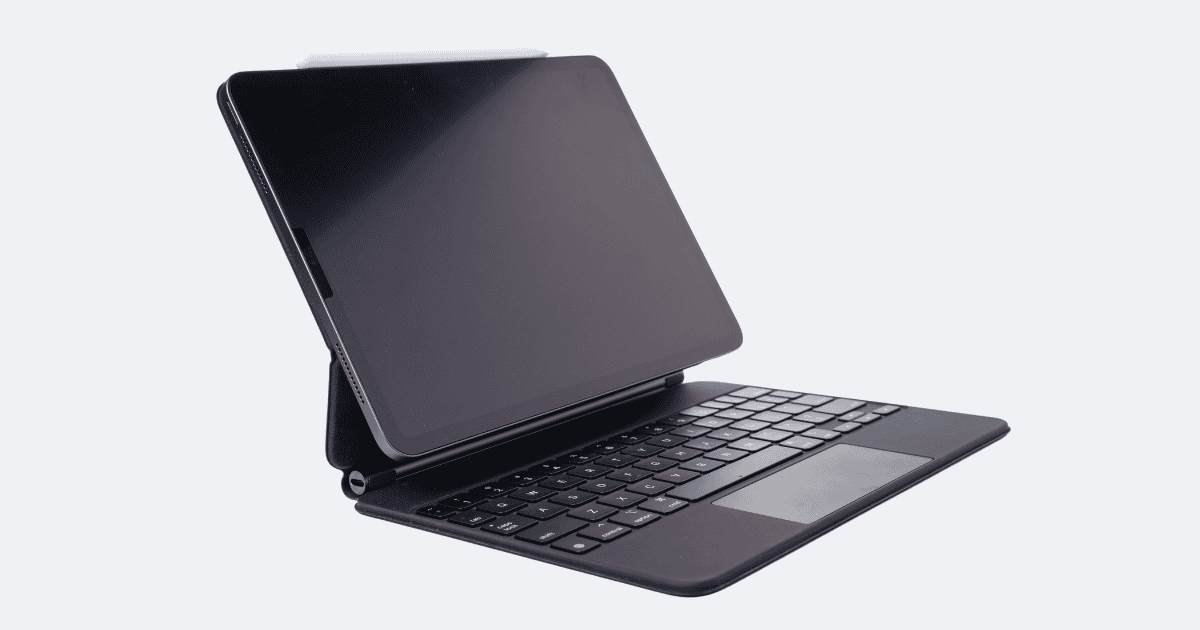
With the iPad Pro Magic Keyboard in hand, you hold a tool that can revolutionize your productivity. The sleek design and seamless integration with your iPad Pro provide a glimpse into a world where efficiency and convenience intertwine effortlessly. From enhanced typing capabilities to intuitive trackpad navigation, the Magic Keyboard offers a glimpse into the future of portable workstations. But how does it truly harness this power, and what secrets lie within its sleek exterior? Let’s uncover the mysteries of the iPad Pro Magic Keyboard together.
Benefits of Using Magic Keyboard
Enhance your iPad Pro experience with the transformative capabilities of the Magic Keyboard. The backlit keys on this keyboard case offer a premium typing experience, allowing you to work efficiently in any lighting condition.
The trackpad integrated into the keyboard provides precise cursor control, enhancing your navigation through iPadOS and improving overall productivity.
Additionally, the inclusion of a USB-C port on the Magic Keyboard adds functionality by allowing you to conveniently charge your iPad Pro and connect various accessories without the need for additional dongles or adapters.
These features combine to elevate your iPad Pro usage to a new level, providing a seamless shift from a tablet to a more laptop-like experience.
The Magic Keyboard’s thoughtful design and advanced features make it a worthwhile investment for those looking to maximize their productivity on the iPad Pro.
How to Set Up Magic Keyboard
Setting up the Magic Keyboard involves securely attaching it to your iPad Pro and adjusting the viewing angle for best usability. The keyboard setup process is straightforward – simply align the Smart Connector on the back of the keyboard with the corresponding port on your iPad Pro. Once attached, the Magic Keyboard instantly pairs with your iPad without the need for additional steps.
The Magic Keyboard’s trackpad support enhances navigation, allowing you to interact with your iPad Pro more intuitively. Additionally, the inclusion of a USB-C port on the Magic Keyboard enables convenient charging and accessory connectivity, eliminating the hassle of reaching for your iPad’s ports.
To optimize your experience, ensure proper alignment between the iPad and the Magic Keyboard. This alignment not only guarantees the keyboard functions correctly but also enhances the overall usability of your iPad Pro. By following these simple steps, you can quickly set up your Magic Keyboard and start enjoying its full capabilities.
Connecting Magic Keyboard to iPad
To connect the Magic Keyboard to your iPad, align the Smart Connector on the back of the keyboard with the corresponding port on your iPad Pro. This connection allows the Magic Keyboard to draw power from the iPad, eliminating the need for separate charging. Once aligned and connected, the keyboard is instantly ready for use, without requiring any additional pairing or setup steps. This seamless integration ensures a hassle-free experience, allowing you to focus on your work without interruptions.
By establishing this physical connection, the Magic Keyboard for iPad becomes an extension of your device, enhancing its functionality with a laptop-like experience. The power from the iPad not only powers the keyboard but also enables the smooth operation of the trackpad and keys. Proper alignment is vital for ensuring top-notch performance, so make sure the Smart Connector is securely attached to the iPad.
In case you encounter any issues during the connection process, refer to the troubleshooting steps provided to resolve any potential challenges swiftly. Enjoy the convenience and productivity boost that the Magic Keyboard brings to your iPad Pro.
Tips for Using Magic Keyboard
For improved efficiency with your Magic Keyboard, consider customizing key shortcuts that suit your workflow. By personalizing shortcuts, you can streamline your tasks and enhance productivity.
The Magic Keyboard’s trackpad offers precise cursor control, making navigation on your iPad Pro smooth and intuitive. Guarantee your iPad is correctly aligned with the Magic Keyboard for peak functionality, as alignment affects the overall user experience.
When using the Magic Keyboard with different iPad Pro models, take note of compatibility tips to maximize its capabilities. Each iPad Pro model may have specific features that work best with the Magic Keyboard, so familiarize yourself with these to make the most out of your setup.
Customizable settings on the Magic Keyboard allow you to tailor the experience to your preferences. From adjusting the trackpad sensitivity to assigning custom shortcuts, explore these options to tailor the keyboard to your liking. These tips will help you make the most of your Magic Keyboard and elevate your iPad Pro usage.
Charging Your iPad With Magic Keyboard
When it comes to maximizing the functionality of your iPad Pro with the Magic Keyboard, understanding how to efficiently charge your device is crucial.
The Magic Keyboard doesn’t have its own battery; it draws power directly from your iPad’s battery. To charge your iPad while using the Magic Keyboard, simply connect the iPad’s charger to the USB-C port on the keyboard.
It’s important to note that there are no specific indicators on the Magic Keyboard to show its charging status. Instead, you’ll need to rely on the iPad’s battery level to gauge the power of the keyboard.
Maximizing Trackpad and Keyboard Settings
Enhance your productivity on the iPad Pro by customizing the trackpad and keyboard settings to suit your preferences and optimize your workflow.
The Magic Keyboard’s trackpad makes it easy to navigate your iPad Pro with precision. Customize the trackpad settings to enable features like tap to click, two-finger secondary click, and natural scrolling, enhancing your overall user experience.
Additionally, adjusting keyboard settings such as key repeat, brightness, and language preferences allows for a personalized typing experience. Take advantage of keyboard shortcuts and key combinations to streamline tasks and boost efficiency when working on your iPad Pro.
By fine-tuning these settings to your liking, you can make the most out of the Magic Keyboard’s capabilities, making your workflow smoother and more seamless.
Don’t forget to explore Accessibility settings for further customization tailored to your specific needs or preferences.
Switching to Onscreen Keyboard
Maximize your flexibility and usability on the iPad Pro with Magic Keyboard by seamlessly switching between the physical keyboard and onscreen keyboard simply through detachment or folding. When you detach the Magic Keyboard from your iPad Pro, the onscreen keyboard will automatically appear for text input. Similarly, folding the Magic Keyboard behind the iPad Pro triggers the onscreen keyboard to show up, providing you with the option to choose between the physical keys and the onscreen layout based on your preference.
To illustrate this further, consider the following comparison table showcasing the benefits of each keyboard option:
| Feature | Magic Keyboard | Onscreen Keyboard |
|---|---|---|
| Convenience | Easily detachable and attachable | Always available on screen |
| Tactile Feedback | Enhanced keypress experience | Touch-based typing |
| Portability | Adds weight and bulk | Lightweight and compact |
| Customization Options | Limited by physical keys | Diverse layouts and themes |
This seamless shift between the Magic Keyboard and onscreen keyboard enhances your overall iPad Pro experience, catering to different typing preferences and scenarios.
Comparing Magic Keyboard With Other Options
Comparing the Magic Keyboard with other options reveals distinct features and functionalities that cater to different user preferences and needs. The Apple Magic Keyboard stands out for its laptop-like typing experience, backlit keys, and glass trackpad, providing a seamless typing and navigation experience.
On the other hand, the Logitech Combo Touch offers excellent trackpad functionality and various viewing angles for versatility. Additionally, the Zagg Pro Keys features comfortable, responsive keys and a removable inner case with two viewing angles.
While the Apple Magic Keyboard is specifically designed for the 12.9-inch iPad Pro, offering high adjustability and a slim design, other options provide different strengths such as protection, size, weight, and additional features. When choosing an iPad Pro keyboard case, consider key criteria like typing experience to make sure it meets your specific needs and enhances your overall productivity.
Enhancing iPad Pro Productivity
To optimize your iPad Pro productivity, consider how the Magic Keyboard‘s ergonomic design and functional features can enhance your workflow seamlessly.
The Magic Keyboard boasts backlit physical keys and a responsive trackpad, offering a laptop-like typing experience that improves efficiency. Its innovative design raises the iPad Pro to an ergonomic eye level, reducing strain and enhancing focus during long work sessions.
With two magnetic hinges, the Magic Keyboard allows for versatile screen adjustments, surpassing the Smart Keyboard Folio in adaptability. The inclusion of a USB-C port further enhances functionality, enabling convenient charging and accessory connectivity.
MacReview Verdict
Now that you’ve learned how to utilize the power of the iPad Pro Magic Keyboard, get ready to elevate your productivity to new heights.
With its seamless setup, premium typing experience, and efficient trackpad, the Magic Keyboard transforms your iPad Pro into a versatile workstation.
Stay tuned for more tips and tricks on maximizing your productivity with this game-changing accessory.
Get ready to unleash the full potential of your iPad Pro with the Magic Keyboard!