
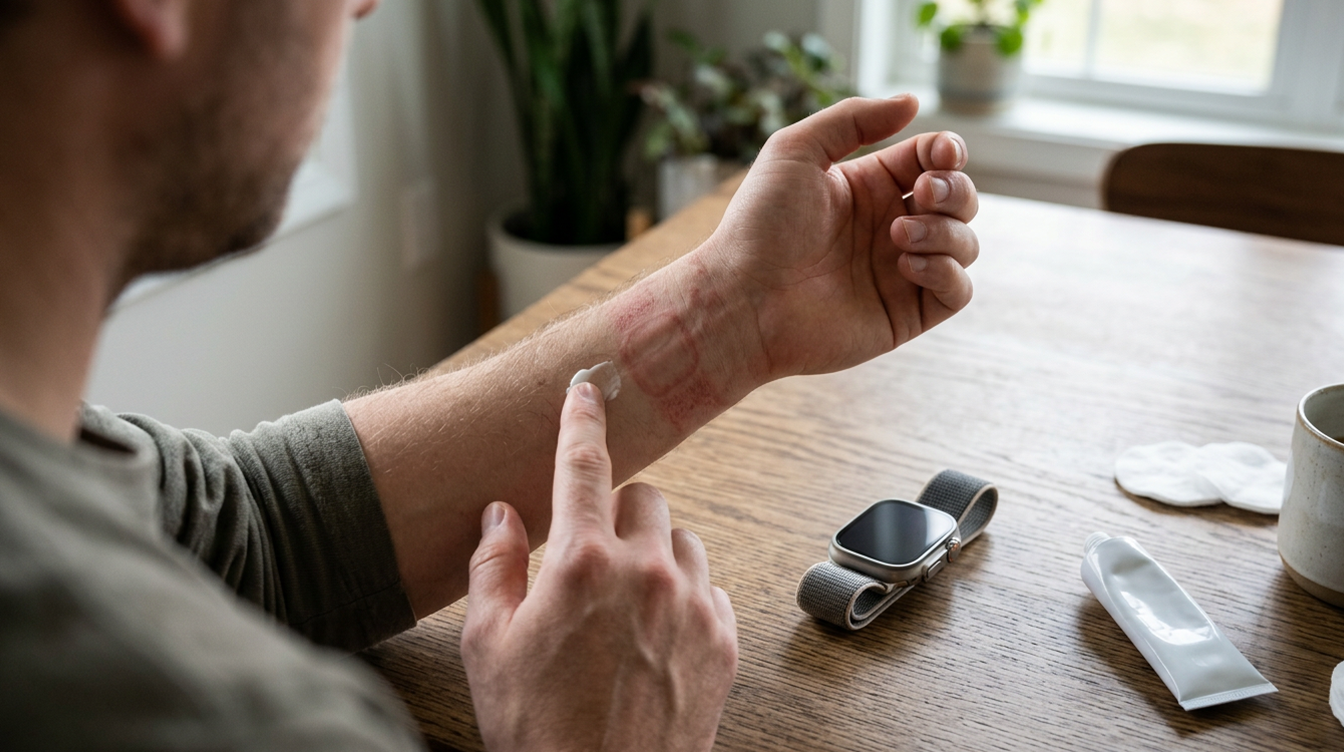
Apple Watch Skin Irritation on Series 12? Here Is What to Try

Smartwatch lying face down on a towel beside a wrist with a faint red mark, a common sign of apple watch skin irritation

You pull off your new watch after a long day and find a pink, slightly angry patch sitting exactly where the sensor was. If that sounds familiar, you are in good company. A cluster of Series 12 and Ultra 4 owners have spent this week describing the same Apple Watch skin irritation: redness plus a burning feeling under the back of the watch.

The complaints are piling up on owner forums and Reddit, according to a report from MacRumors. Nobody has pinned the problem on the new hardware yet, and the first things worth trying are cheap, quick and mostly about fit and hygiene.

What Series 12 and Ultra 4 owners are describing

The reports follow a pattern. This Apple Watch skin irritation starts as warmth or a burning sensation, then a red mark, and it shows up under the sensor bump rather than along the strap.

Outcomes vary. A few owners say the redness faded once their skin got used to the watch, others credit a proper wipe-down of the watch back and band, and some sent the watch back.

Suspicion naturally falls on what is new this year. These models reportedly sample heart rate every five seconds, and the sensor module has grown a bigger ECG electrode, a ring of photodiodes and larger green LEDs (the same hardware behind the features in our explainer on Series 12 and Ultra 4 Health Age). None of those changes has been linked to the rash so far. Sore wrists are also nothing new, with similar complaints dating back to the first Apple Watch.

Why the sensor area gets the worst of it

The back of the watch has to stay in contact with you, because Apple says the heart sensors and Wrist Detect both rely on it. That makes the sensor bump the one spot pressed against your wrist all day, which is why Apple Watch skin irritation tends to start there.

Apple’s guide to wearing Apple Watch names the usual culprits behind Apple Watch skin irritation. A strap that is too tight can irritate, a strap that is too loose can chafe, and soap or sweat trapped under the case adds to both.

Materials get a mention too. Nickel turns up in some cases, bands and magnets, though Apple puts the levels under Europe’s strict REACH limits, and trace acrylates from adhesives are kept away from your skin by design.

6 fixes for Apple Watch skin irritation, easiest first

  1. Give your wrist a break. Leave the watch off until the redness calms down. If swelling, itching or redness hangs around, Apple says to check with a physician before wearing it again.
  2. Do the shake test. Shake your wrist, then flip your palm up. If the case lifts off your skin, the band is loose enough to rub, so tighten it a notch. Aim for snug but comfortable, with a little room for your skin to breathe.
  3. Slide it up your arm. Apple suggests wearing the watch just above the wrist bone, a bit closer to your elbow, instead of right on the bone.
  4. Clean the back and the band. Wipe the sensor area and the strap, then let both dry completely. Make it a habit after workouts and anything involving sunscreen or lotion.
  5. Dry your skin, not just the watch. A spotless watch on a damp wrist still traps moisture, and that alone can keep Apple Watch skin irritation going, so towel off before you strap it back on.
  6. Use the right band for sweat. Apple says leather, FineWoven, Milanese Loop, Link Bracelet and Hermès knit bands are not made for water or workouts, so switch to a sport band when you train. Solo Loop owners should also check for slack, because Apple notes those bands can stretch with time. Our roundup of Apple Watch band styles covers the options.

Can a watchOS update fix the rash under the sensor?

Possibly, but only in one scenario. If the faster heart rate sampling turns out to matter, a software update could change how often the sensors fire. If the cause is fit, sweat or a material sensitivity, no update will touch it.

So far the only guidance on record is Apple’s general wearing advice, so there is no promised fix to hold out for. If you bought the watch recently and the Apple Watch skin irritation returns after you have cleaned it and fixed the fit, a return or exchange inside your return window is a sensible move.

Apple Watch rash questions, answered

Why do I get an Apple Watch rash under the sensor?

The sensor sits against your skin all day, so sweat, soap and lotion collect there. Apple also points to bands that are too tight or too loose, and says nickel or adhesive sensitivity is possible but unlikely for most people.

What should I do if my Apple Watch rash won’t go away?

Stop wearing the watch and talk to a physician. Apple advises getting medical advice before putting the watch back on if redness, swelling or itching continues.

Can an Apple Watch rash come from the band?

Yes. Fit matters: a strap pulled tight presses on the skin, while a loose one slides around and chafes. Apple also says leather and FineWoven bands are not meant for workouts, so a sport band is the better pick when you sweat.

Should you keep wearing a Series 12 that irritates your skin?

If the redness is mild and fades once you adjust the fit and keep things clean, keep wearing it and keep an eye on your skin. If it burns, swells or keeps coming back whatever you change, take the watch off, see a doctor and lean on that return window. Apple treats most Apple Watch skin irritation as a fit and cleanliness issue, but your wrist gets the final vote.


This is a recurring post, regularly updated with new information and offers.

The MacReview YouTube Channel

The MacReview YouTube Channel

Visit Our
Youtube Channel

Watch Anywhere, Anytime!

Three iPhones on a dark background with pink lighting showing the ChatGPT and Apple Music connection flow, including an "Apple Music" app page with a Connect button, a "Connect Apple Music" permissions dialog, and a ChatGPT chat generating a holiday song playlist.
Apple Music now works as a ChatGPT extension, so you can search tracks and build playlists using plain language. Here is how to set it up and use it.
iPhone Duo, Apple's first foldable iPhone, shown partially opened to reveal its inner display
Apple's Surprise and Shine event brought a foldable iPhone, two Pro phones, two watches, new AirPods, and a rebuilt Health app. Every product, price, and ship date in one place.
Reward your inbox with the TPG Daily newsletter img

Subscribe to Our Newsletter

REWARD YOUR INBOX WITH THE MACREVIEW NEWSLETTER

Microsoft 365 wordmark surrounded by glossy app icons for Word, Excel, PowerPoint, Outlook, OneNote, Exchange, and Microsoft 365 on a soft light background.

Microsoft 365 experienced a significant service disruption affecting business and enterprise customers across North America. The outage impacted core productivity services including Outlook email, Microsoft Defender, and administrative portals, leaving users unable to access critical business tools for several hours. […]

Wireless printer with WiFi signal icon representing Apple AirPrint enterprise printing

When Apple introduced AirPrint in 2010, enterprise IT administrators largely dismissed it as a consumer-focused feature. More than a decade later, AirPrint has fundamentally transformed how organizations handle printing infrastructure, forcing the entire industry to abandon complex driver management in […]

Password Utility Solves the FileVault Reboot Problem for Remote Mac Management

Managing remote Macs presents unique challenges, particularly when FileVault encryption creates accessibility issues during restarts. A new utility from Twocanoes Software addresses this long-standing problem for IT administrators who need reliable access to devices deployed across distributed locations. The FileVault […]

iPhone and AirPods on a black and white background

Introduction A recent rumor from China suggests that Apple is set to continue with the color-infused back glass technology in the upcoming iPhone 16, mirroring the aesthetic introduced in the standard iPhone 15 models. This development indicates a consolidation of […]

Man working on a laptop in a modern office at night with “Creator Studio” text and Apple logo above, plus floating creative app icons in the foreground.

Apple is reportedly planning to expand its subscription bundle offerings and introduce more paid features across its software ecosystem, following the launch of Apple Creator Studio last month. The company appears to be evaluating opportunities to monetize additional areas of […]

Three iPhones on a dark background with pink lighting showing the ChatGPT and Apple Music connection flow, including an "Apple Music" app page with a Connect button, a "Connect Apple Music" permissions dialog, and a ChatGPT chat generating a holiday song playlist.
Apple Music now works as a ChatGPT extension, so you can search tracks and build playlists using plain language. Here is how to set it up and use it.
Laptop on a dark desk displaying the Opera One browser start page with color-coded Tab Islands in the tab bar, a search field, and shortcut tiles over a purple and orange wave wallpaper.

,

Opera has released Opera One R3, a significant update to its flagship browser that introduces customizable Tab Islands, an enhanced AI assistant with YouTube comprehension capabilities, and dynamic themes with dedicated soundscapes. The update represents Opera’s continued effort to differentiate […]

Apple Arcade games available across Apple devices

In 2025, you’ll notice significant changes in Apple Arcade’s fan favorites, as exclusive updates aim to refine and enhance your gaming experience. Titles like WHAT THE CAR? and Hello Kitty Island Adventure are set to receive major gameplay improvements, alongside […]

Resident Evil 2 on iPhone, iPad and Mac

With the anticipated release of Resident Evil 2 on iOS and macOS, set for December 10, 2024, fans of the franchise are on the edge of their seats. This iconic survival horror game promises a refreshed experience tailored for mobile […]

Phone playing an audiobook beside earbuds and a paperback on a park bench, tracking Spotify audiobooks listening hours
Spotify is bringing audiobooks to more than 180 markets, with 12 hours a month included in eligible Premium plans. Here is how that time is counted, how to check what is left and how to buy more.
Microsoft 365 wordmark surrounded by glossy app icons for Word, Excel, PowerPoint, Outlook, OneNote, Exchange, and Microsoft 365 on a soft light background.

Microsoft 365 experienced a significant service disruption affecting business and enterprise customers across North America. The outage impacted core productivity services including Outlook email, Microsoft Defender, and administrative portals, leaving users unable to access critical business tools for several hours. […]

Sign Up For Newsletter mobile

Catch The Latest

Sign Up For Newsletter

Apple has confirmed plans to begin manufacturing the Mac mini in the United States later

Apple Music is currently offering a compelling promotion that allows new subscribers to enjoy three

Been FaceTiming with my younger daughter Jordyn recently and were messing around with this new

Samsung has swiftly capitalized on the backlash from Apple’s controversial “Crush!” ad for the M4

Scroll to Top















